About Top Video Downloader
Updated October 7, 2026
Top Video Downloader is a desktop app for Windows, macOS (Apple Silicon) and Linux that downloads video and audio from YouTube, TikTok, VK, Instagram and 60+ other sites we test daily. It bundles yt-dlp, ffmpeg and deno, runs every download on your own computer, and uses its server only for your account and download rights.
What is Top Video Downloader?
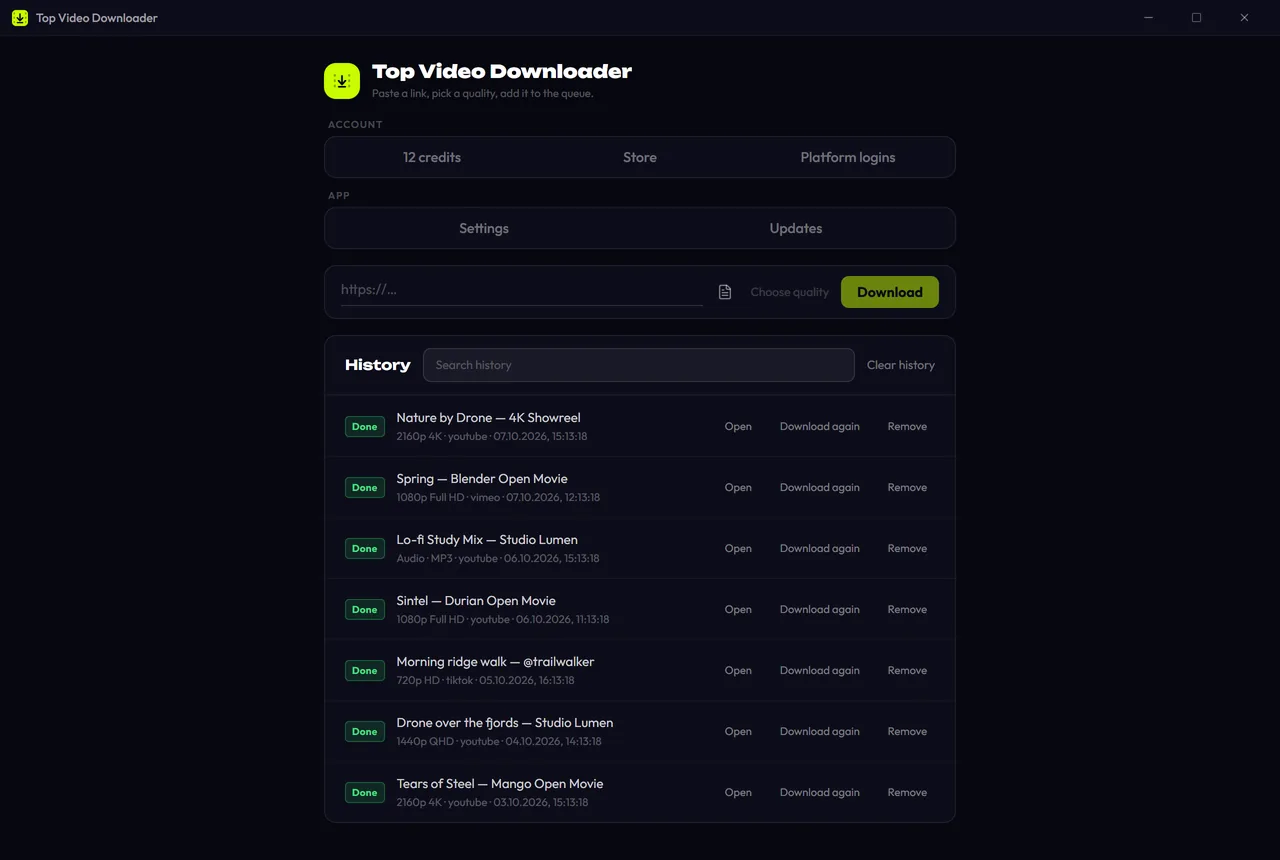
It is a regular desktop program with no terminal involved. Paste a link, pick a quality and a folder, and click Download. The app fetches the streams, merges video with sound, converts audio if asked, embeds the cover and metadata, and saves the file to your folder. A free account gets 10 downloads a day up to 720p, and you can try 3 downloads before creating one. Anything above 720p uses credits or a subscription; see pricing.
- Platforms
- Windows x64, macOS on Apple Silicon (no Intel Mac build), Linux x86-64
- Engine
- yt-dlp + ffmpeg + deno, all inside the installer
- Languages
- English and Russian
- Current version
- 2.0.0, released November 2, 2026
- Source code
- closed; installers and checksums are published on GitHub
Why build another video downloader?
Many desktop downloaders are built on yt-dlp, an open-source project that can pull video from hundreds of sites. It is also a command-line tool: you need the flags, ffmpeg next to it, updates whenever a site changes, and now the deno runtime for logged-out YouTube. Online converters skip the terminal but bring pop-up ads and redirects, cap quality or length, and route your video through someone else's server.
Top Video Downloader sits between the two: the power of yt-dlp with a window, a queue, a quality picker and error messages a person can read. Everything ships in one installer. How this compares with running yt-dlp yourself is on the yt-dlp GUI page.
How does the app work?
- The app is built with Tauri 2: a Rust core and a React interface. The download logic lives in our Rust library
tvd-engine, which builds yt-dlp arguments, reads progress, classifies errors and decides on retries (a 403 is retried once while impersonating a browser). - Bundled tools: yt-dlp downloads, ffmpeg and ffprobe merge, convert and embed tags, and deno is what YouTube needs. The Windows build also carries an embedded Python for yt-dlp.
- Downloads are local. Video travels from the site straight to your disk. It never passes through our server.
- The server keeps accounts and devices, counts the free daily quota, credits and subscriptions, handles payments and promo codes, and sends sign-in emails. Rights are reserved before a download starts, charged only when it succeeds, and returned if it fails or you cancel.
What data do we keep? Our privacy principles
- On the server: your email (if you sign in by email), a random device id, the rights ledger, and payment records (the on-chain transaction id, plus a refund address if a refund was made). With Telegram sign-in, your Telegram user id. For the trial, a salted hash of your machine id, so reinstalling does not reset the 3 free tries.
- Not on the server: anything about what you download. Links, titles and files stay on your computer. History (up to 500 entries) is local, and it keeps links only if you turn on "Remember links", which is off by default.
- Platform logins: you sign in to the site inside an app window. The cookies are encrypted with AES-256-GCM, and the key sits in your OS keystore (Windows Credential Manager, macOS Keychain, Secret Service on Linux). They are never sent to our server.
- Anonymous stats are on by default and can be switched off in Settings. They are events such as "download succeeded" with the platform name, error class, quality, app version and OS. Never URLs, titles or files.
- No ads, in the app or on the site. There is no ad SDK inside.
The full text is in the Privacy Policy.
How are updates signed?
The installers are not signed with a commercial certificate, so Windows SmartScreen and macOS Gatekeeper warn about an unknown publisher. What is signed is the manifest the app updates itself from: it carries a SHA-256 hash and an Ed25519 signature for every installer, and the app checks both before running one. The signing keys exist only in the isolated release build environment.
Since 2.0, yt-dlp also updates separately through a signed channel, checked 20 seconds after launch and then every 6 hours. If a signature does not match, the app keeps the yt-dlp it has. Every GitHub release includes a SHA256SUMS file, and the website shows each installer's SHA-256 next to the download button. The step-by-step check is in how to verify the installer.
Release history in brief
- 0.1.0, July 2, 2026: first public release with a queue, quality picker, dark theme, accounts, crypto payments and installers for three operating systems.
- 0.1.1, July 3: platform logins for 20 sites, and 60+ sites verified without any login.
- 0.1.2 and 0.1.3, July 28: an Open button and dozens of queue fixes; 0.1.3 fixed 0.1.2 failing to start.
- 0.1.4, August 17: TikTok downloads work again (what happened).
- 0.1.5 and 0.1.6, October 6: sign-in no longer gets forgotten, downloads start sooner, and macOS and Linux keep the sign-in in the system keychain.
- 2.0.0, November 2: playlists and channels, subscriptions, clips, SponsorBlock, new sign-in options and lifetime plans.
Every change, version by version, is in the changelog.
Which sites work right now? The status page
Every night our server downloads one real video from each of 63 platforms, using the same engine the app ships with and no logins. The results go to the status page: which platforms passed, an error class for the rest (network, rate limited, geo-blocked, login required and so on), and daily totals for the last 14 days. It is not 63 out of 63 every day: sites change, and some refuse a logged-out check while working fine for you with a saved login. We publish the misses too, because that is how a breakage like the August TikTok block becomes visible.
Which languages does the app support?
The interface comes in English and Russian, switched in Settings. The Windows installer is bilingual too and follows your Windows language, and so is this website. The app is desktop-only; what you can do on a phone today is on the mobile page.
See it in action
How to reach us and where to follow
We do not run email support. Questions are answered on Telegram, and that is the best place to report a broken site or a payment problem. If something will not download, attach the log from Settings → Diagnostics; links are stripped from it. More on the contact page. News and short videos are on our socials:
- YouTubeyoutube.com/@top_video_downloader
- Telegramt.me/topvideodownloader
- X (Twitter)x.com/topvideodl
- TikToktiktok.com/@topvideodownloader
- Instagraminstagram.com/topvideodownloader/
Download Top Video Downloader
Free: 3 downloads without an account, then 10 a day up to 720p, no ads. 4K and unlimited downloads come with a subscription, a lifetime plan or credits.
Top Video Downloader is a desktop app
It runs on Windows, macOS and Linux. Send the link to yourself to open it on your computer, or join the waitlist for a phone version.
Read next
- Top Video Downloader pricingTop Video Downloader is free for 10 downloads a day up to 720p with an account, plus 3 trial downloads without one. For 1080p, 4K or more downloads, buy credits (1 credit = 1 video at any quality, $4.99 for 10), a subscription from $4.99 a month, or lifetime for $34.99. Crypto only, no auto-renewal.
- Top Video Downloader changelogThis page lists every published version of Top Video Downloader with its date and changes. The app checks for updates on launch, downloads them in the background and verifies the signature before installing, so updating is usually one click on Restart.
- How to verify Top Video Downloader and get past SmartScreenWindows SmartScreen and macOS Gatekeeper warn about Top Video Downloader because its installers are not code-signed yet, not because a threat was found. You can confirm the file is the one we published by comparing its SHA-256 checksum with SHA256SUMS on the GitHub release. In-app updates are checked automatically with an Ed25519 signature.
- Contact Top Video DownloaderTop Video Downloader support and news live on Telegram: t.me/topvideodownloader. Our official social profiles below are the only ways to reach us; there is no support email address. To get help in one go, include your app version, OS, the link, the exact error and the diagnostic log.
- yt-dlp GUI: yt-dlp with an interface, no command lineTop Video Downloader is a yt-dlp GUI for Windows, Apple Silicon Macs and Linux. The installer bundles yt-dlp, ffmpeg and Deno, and yt-dlp updates separately from the app through Ed25519-signed packages. The free plan gives 10 videos a day up to 720p. If you want a free, open-source GUI, Parabolic and Open Video Downloader are good picks.
- How to tell a safe video downloader from a malicious oneA safe video downloader comes from its official site, installs only itself, shows no ads or fake buttons, asks for no permissions it doesn't need and publishes checksums you can verify. Most malware around video downloading hides in bundled installers, look-alike download buttons, notification spam and browser extensions with broad permissions.