How to download Instagram Reels and videos on PC
Updated October 7, 2026 · tested with version 2.0.0
Top Video Downloader saves Instagram Reels and video posts to your PC as MP4, and version 2.0 can grab a whole profile, up to 300 videos. Instagram shows most videos only to signed-in users, so you sign in to Instagram once inside the app. That login stays encrypted on your computer and never reaches our servers.
- Instagram login
- Required for profiles; needed for most single Reels and posts too
- What you can save
- Reels, video posts, videos inside carousels, whole profiles (up to 300 videos)
- Quality
- The best version Instagram serves your account (Instagram re-compresses uploads)
- Formats
- MP4 video; audio as MP3, M4A, Opus, FLAC or WAV
- Free plan
- 3 trial downloads with no account, then 10 a day up to 720p
- Your login
- Stored only on your PC, encrypted with AES-256-GCM
Download Instagram Reels on PC: quick steps
- 1
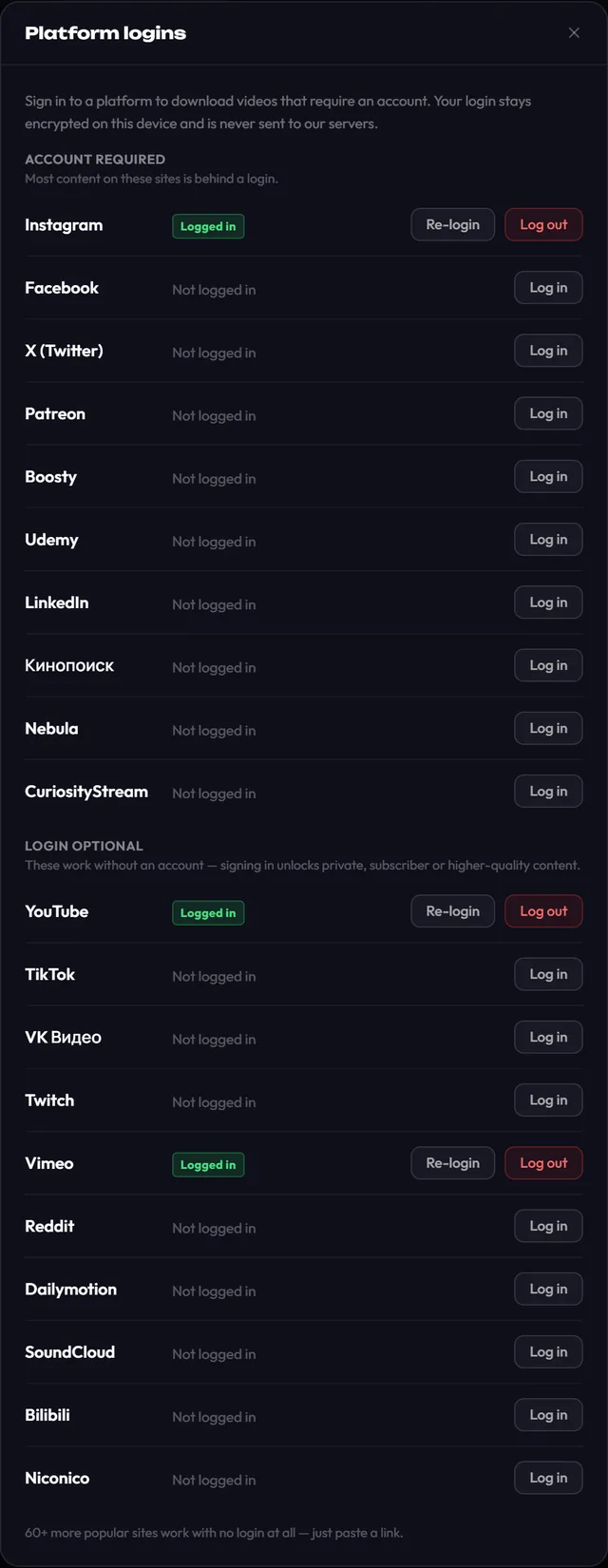
Sign in once: click Platform logins on the main screen, then Log in next to Instagram, sign in on Instagram's page and click Save login. (Details below.)
- 2
Copy the Reel or post link: Share → Copy link on your phone, or the address bar on a PC.
- 3
Paste it into Top Video Downloader and click Check formats.
- 4
Pick a quality, or Audio only for the sound, and click Add to queue. The MP4 lands in your chosen folder.
Download Top Video Downloader
Free: 3 downloads without an account, then 10 a day up to 720p, no ads. 4K and unlimited downloads come with a subscription, a lifetime plan or credits.
Top Video Downloader is a desktop app
It runs on Windows, macOS and Linux. Send the link to yourself to open it on your computer, or join the waitlist for a phone version.
Why Instagram needs a login, and how the app keeps it safe
Try scrolling Reels in a private browser window: after a few videos Instagram asks you to log in. The app's engine (yt-dlp) hits the same wall. A public Reel sometimes downloads without a login, but don't count on it, and Instagram lists a profile's videos only to a signed-in browser. Without a login the app tells you so plainly: "Log in to Instagram in Platform logins, then try again."
Here is what happens when you sign in. You type your username and password on the real instagram.com page, opened in a window inside the app. The app keeps the session cookies, not your password. It encrypts them with AES-256-GCM and stores the key in your system's keystore: Windows Credential Manager, the macOS Keychain or Secret Service on Linux. The cookies are never sent to our servers. Log out deletes the saved login from disk.
How to download all videos from an Instagram profile (new in 2.0)
Paste a profile link, instagram.com/username/ or instagram.com/username/reels/. yt-dlp can't read Instagram profiles right now, so the app fetches the list itself through Instagram's web interface, using your saved login. Only posts with video make the list, including carousels with at least one video; photos are skipped.
- Up to 300 videos, read from at most 10 pages of the feed. The app waits 0.8–1.6 seconds between pages so the requests don't arrive at machine speed.
- Pick what you need: All, None or the first N (10 by default), one quality cap for the whole list, and an optional folder named after the profile.
- Subscribe to the profile and the app checks it every 6 hours while it runs, queuing only videos posted after you subscribed. A subscription never spends credits on its own.
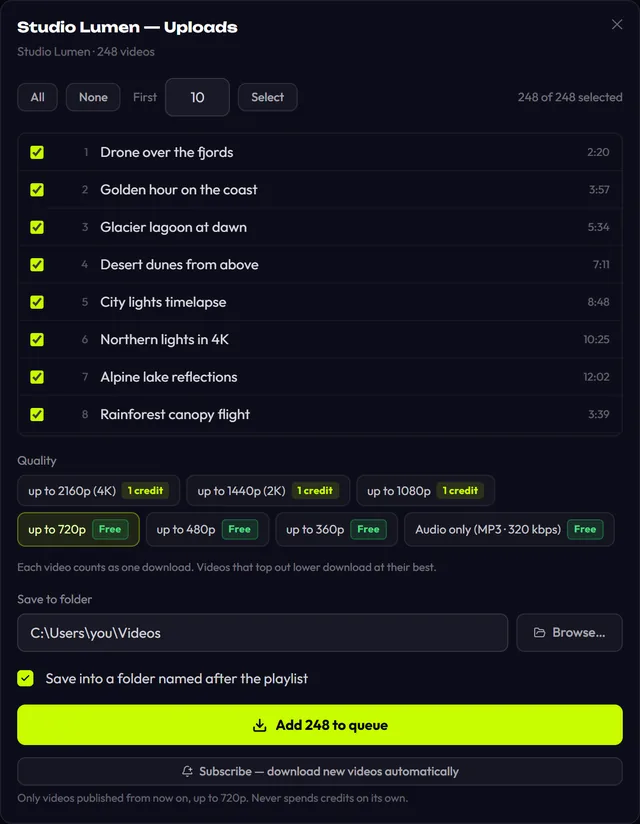
Profile download is new in 2.0. If Instagram changes its web interface, it may stop working until the next app update. Single Reels go through yt-dlp and are not affected.
Instagram links the app accepts
instagram.com/reel/…: a Reel.instagram.com/p/…: a video post or a carousel.instagram.com/tv/…: old IGTV links.instagram.com/username/: the whole profile, login required.- Stories and Highlights: we haven't tested them, so no promises.
Instagram video quality and the free plan
Instagram re-compresses every upload, so nobody, not us and not any other Instagram video downloader, gets the creator's original file. The app lists the versions Instagram serves to your account and saves the one you pick as MP4. One thing to know on the free plan: the 720p limit counts frame height, and Reels are vertical, so their main versions are taller than 720 pixels and cost 1 credit. Each row shows Free or 1 credit before you download, and Audio only is always free. Details on pricing.
Instagram video not downloading? Try this
- "Sign-in required" although you signed in: your Instagram session expired. Open Platform logins and click Re-login.
- "Instagram asked to slow down": Instagram is rate-limiting you. Wait a few minutes before opening the profile again, and don't load several big profiles back to back.
- Private account: you can only download what your account can see, so follow the creator and wait for approval.
- The app says there is nothing to download: the post contains only photos. The app downloads video and audio, not images.
The app runs on computers only: Windows 10/11, Apple Silicon Macs and 64-bit Linux. If you watch Reels on your phone, see downloading on mobile.
Can I download Instagram videos without logging in?
Sometimes a public Reel downloads without a login, but Instagram often answers anonymous requests with a login wall, and it never lists a profile's videos to a logged-out visitor. That's why we recommend signing in once under Platform logins. The login is stored only on your computer, encrypted, and never uploaded anywhere.
Is it safe to log in to Instagram inside the app?
The app never stores your password: you type it on Instagram's own page, and only the session cookies are saved. They are encrypted with AES-256-GCM, the key lives in your system's keystore, and the cookies are never sent to our servers. Log out removes them, and you can change your Instagram password at any time.
How many videos can I download from one profile?
Up to 300 videos at a time. The app reads at most 10 pages of the feed and skips photo posts. You can take all of them, none or the first N. Each video counts as one download, and if your free quota runs out the queue pauses and asks before using credits.
How do I download audio from an Instagram Reel as MP3?
Choose Audio only in the quality list. You get MP3 by default; Settings lets you switch to M4A, Opus, FLAC or WAV and pick up to 320 kbps. Audio is free within the 10 downloads a day. Remember that music in Reels is usually copyrighted, so keep it for personal use.
Is this Instagram downloader free?
Partly. You get 3 trial downloads without an account, then a free account gives 10 downloads a day up to 720p, with audio always free. Most vertical Reels are taller than 720 pixels, so their video costs 1 credit. A subscription or a lifetime plan removes all limits.
Is it legal to download someone's Reels?
Keeping a personal copy of something you have the right to use is generally fine. Re-uploading someone else's Reel without permission breaks both copyright and Instagram's terms; if you need it for your own project, ask the creator. We cover the details on is it legal to download videos.
Read next
- Facebook video downloader for PC: save videos and ReelsTop Video Downloader saves Facebook videos and Reels to your PC from a link, as MP4 or audio-only MP3. Only some public videos open without a login, so for most of them you sign in to Facebook once inside the app. The login is encrypted and kept on your computer; it never reaches our servers.
- How to download TikTok videos without a watermark on PCTop Video Downloader saves TikTok videos to your PC from a link, and it takes the stream TikTok's own player uses, not the Save-video file where TikTok stamps its logo and the creator's username. Public videos need no TikTok login. Audio as MP3 is free; on the free plan a vertical TikTok video costs 1 credit.
- Download whole playlists, channels and profilesTop Video Downloader 2.0 downloads whole playlists, YouTube channels and TikTok or Instagram profiles to your computer. Paste the link and the app lists up to 1,000 videos; tick all, none or the first N, set one quality cap, and each video counts as one download. Free accounts get 10 a day up to 720p.
- Subscriptions: auto-download new videos from a channelA subscription in Top Video Downloader 2.0 downloads a channel's, playlist's or profile's new videos to your computer on its own. The app checks each subscription every 6 hours while it's running (including from the tray), queues up to 20 new videos per check, and never spends credits by itself.
- How to download videos on your phoneTop Video Downloader is a desktop app for Windows, macOS on Apple Silicon and Linux; there is no Android or iPhone version today. To get a video onto your phone, send the link to yourself, download it on a computer and move the file over. Join the waitlist to hear when a phone version ships.
- Is it legal to download videos from YouTube and other sites?Downloading a video isn't automatically legal or illegal: it depends on who owns it, what the site's terms allow and where you live. Your own uploads, public-domain films and Creative Commons videos are generally fine. YouTube's terms forbid downloading without its permission, and sharing someone else's video almost always needs the rights holder's consent.