How to download 4K videos on your PC
Updated October 7, 2026 · tested with version 2.0.0
Paste the link into Top Video Downloader and pick “2160p (4K)”, which appears whenever the site has the video in 4K. A 4K download costs 1 credit, exactly like 1080p, and is unlimited with a subscription or lifetime license. The free plan stops at 720p. YouTube 4K usually saves as MKV, since YouTube only serves AV1 or VP9.
- 4K price
- 1 credit per video, the same as 1080p and 1440p
- Unlimited
- Subscription or lifetime license
- Free
- Up to 720p (10 downloads a day on a free account)
- Max
- What the site has: 1440p (2K), 2160p (4K), 4320p (8K) when available
- Container
- MP4 when the codecs fit MP4, otherwise MKV
- Runs on
- Windows 10/11, macOS on Apple Silicon, Linux x86-64
How much does it cost to download 4K video?
| Option | 4K | Price |
|---|---|---|
| Free account | No, up to 720p | $0 |
| Credits | 1 credit per video | 10 for $4.99 (≈$0.50 a video), 50 for $14.99, 100 for $24.99 (≈$0.25) |
| Subscription | Unlimited | $4.99 for 1 month … $27.99 for 12 |
| Lifetime license | Unlimited | $34.99 for 2 computers |
A credit is reserved before the download starts and charged only if it succeeds. If the download fails or you cancel it, the credit comes back. Credits don't expire. If you grab 4K more than 10 times a month, the $4.99 monthly subscription beats even the smallest credit pack.
How to download a video in 4K
- 1
Copy the video link, paste it into the app and click Check formats.
- 2
Choose “2160p (4K)”. It's tagged 1 credit, or Included if you subscribe. 1440p rows carry a “(2K)” tag and 4320p rows an “(8K)” tag.
- 3
Make sure you have the disk space (see the table below), then click Add to queue.
- 4
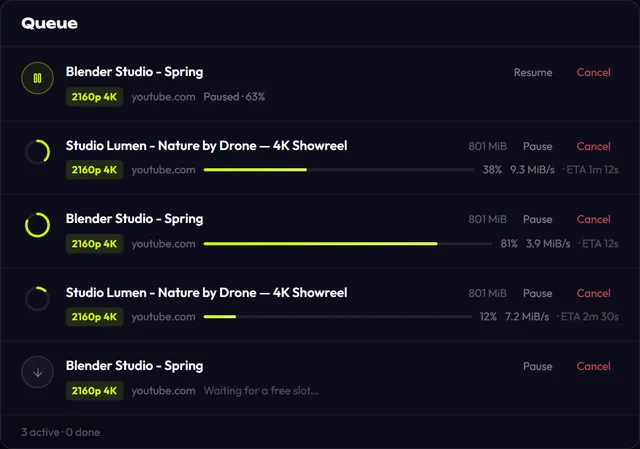
Watch it in the queue, which shows size, speed and time left. Pause stops it, and Resume picks up from the same byte.
Download Top Video Downloader
Free: 3 downloads without an account, then 10 a day up to 720p, no ads. 4K and unlimited downloads come with a subscription, a lifetime plan or credits.
Top Video Downloader is a desktop app
It runs on Windows, macOS and Linux. Send the link to yourself to open it on your computer, or join the waitlist for a phone version.
4K video file size, and why it's MKV
| Quality | YouTube codec | File | Size, 10:35 video | ≈ per minute |
|---|---|---|---|---|
| 720p60 | H.264 + AAC | MP4 | ≈161 MB | 15 MB |
| 1080p60 | H.264 + AAC | MP4 | ≈268 MB | 25 MB |
| 1440p60 | AV1 / VP9 + Opus | MKV | ≈323 / ≈484 MB | 31 / 46 MB |
| 2160p60 (4K) | AV1 / VP9 + Opus | MKV | ≈723 MB / ≈1.37 GB | 68 / 130 MB |
The app prefers MP4 with H.264 and AAC, which any player, TV or editor opens. Above 1080p, though, YouTube has no H.264 at all, only AV1 or VP9 with Opus audio. The app doesn't store that pair in MP4, so the file is saved as MKV. Nothing is re-encoded: you get exactly what YouTube stores. There's no codec picker in the app.
VLC and mpv play AV1 MKV files. On older PCs without hardware AV1 decoding, 4K playback can stutter; if so, take 1080p MP4 instead. The app never upscales: the list only shows resolutions the video really has. When a site doesn't report resolution at all, you get a single “Best available” row, capped at 720p.
Download a whole playlist or channel in 4K
A playlist or channel link opens a list of up to 1000 videos. Under Quality choose “up to 2160p (4K)”. It's a ceiling, not a demand: “Videos that top out lower download at their best.” The app shows the most credits the list can use (“N videos × 1 credit”) and never spends them without your OK. See playlists and channels.
4K download not working? What to check
- No 2160p row. The video has no 4K version, or YouTube is still processing a fresh upload; high resolutions show up later.
- Choppy or black video. Most likely AV1. Open it in VLC or mpv, or download 1080p MP4.
- Your editor rejects MKV. The app doesn't re-encode. Use 1080p H.264, or convert the file separately.
- Disk error. Not enough space, or the folder isn't writable. An hour of 4K easily takes several gigabytes.
- Slow download. Check Settings → Network for a per-download speed limit and the number of downloads at once (1 to 5).
Only download what you have the right to. DRM-protected streaming services and paid content are not supported. More in is it legal to download videos.
4K video download FAQ
Can I download 4K video for free?
Not on a free account, which gives you 10 downloads a day up to 720p. 4K needs 1 credit per video, a subscription, or a lifetime license. A 10-credit pack costs $4.99, about 50 cents per 4K video, and credits never expire.
Does 4K cost more than 1080p?
No. Every download above 720p costs 1 credit, whether it's 1080p, 1440p, 4K or 8K. There's no per-resolution pricing. The credit is charged only after the download succeeds and is returned if it fails or you cancel.
Why did my 4K video save as MKV instead of MP4?
YouTube only stores 1440p and 4K as AV1 or VP9 with Opus audio, while the app's MP4 files carry H.264 + AAC. To avoid re-encoding and quality loss, the file is saved as MKV. VLC and mpv play it; for editing, 1080p MP4 is the easy route.
Can it download 8K video?
Yes, when the site itself has the video in 8K: a “4320p (8K)” row appears, and it costs the same 1 credit. The app doesn't upscale and only lists what the site serves. 8K files are huge, so check your free space first.
How much disk space does 4K video need?
In our test, 10.5 minutes of 4K60 from YouTube came to about 723 MB in AV1 and 1.37 GB in VP9, or 70–130 MB per minute. An hour of 4K is several gigabytes. For comparison, the same video in 1080p60 is about 25 MB per minute.
Does 4K download work on a Mac?
Yes, on Apple Silicon Macs (M1 and later), just like on Windows and Linux. There's no build for Intel Macs. ffmpeg, which joins the video and audio, is bundled, so there's nothing extra to install.
Read next
- How to download YouTube videos on your PCCopy the video link, paste it into Top Video Downloader, click Check formats and pick a quality. The MP4 lands on your disk. Public videos need no YouTube sign-in. A free account gives you 10 downloads a day up to 720p, MP3 audio included, while 1080p, 1440p and 4K cost 1 credit per video.
- Top Video Downloader pricingTop Video Downloader is free for 10 downloads a day up to 720p with an account, plus 3 trial downloads without one. For 1080p, 4K or more downloads, buy credits (1 credit = 1 video at any quality, $4.99 for 10), a subscription from $4.99 a month, or lifetime for $34.99. Crypto only, no auto-renewal.
- Download whole playlists, channels and profilesTop Video Downloader 2.0 downloads whole playlists, YouTube channels and TikTok or Instagram profiles to your computer. Paste the link and the app lists up to 1,000 videos; tick all, none or the first N, set one quality cap, and each video counts as one download. Free accounts get 10 a day up to 720p.
- How to download Vimeo videos on PCTop Video Downloader saves public Vimeo videos to your PC without signing in: paste the link, pick a quality, and you get an MP4 (MKV when needed) up to 4K when the creator uploaded 4K. Private videos need your own Vimeo login inside the app, and password-protected videos are not supported.
- 4K Video Downloader alternative: Top Video Downloader comparedIf 4K Video Downloader Plus's free tier runs out too fast, Top Video Downloader 2.0 has a published limit: 10 free downloads a day up to 720p, 1080p or 4K for one credit, playlists of up to 1000 videos and free channel subscriptions. 4K Video Downloader still wins on Intel Macs, Android and paying without crypto.
- Best video downloaders for PC in 2026There is no single best video downloader for PC. yt-dlp is free and the most flexible, but it is a command-line tool. 4K Video Downloader Plus is polished, but its free tier is limited. Top Video Downloader 2.0 (our app) wraps yt-dlp in a desktop app: 10 free downloads a day up to 720p, plus playlists and channel subscriptions.