How to convert YouTube to MP3 on your PC
Updated October 7, 2026 · tested with version 2.0.0
Top Video Downloader pulls the audio out of any YouTube video and saves it as MP3, or as M4A, Opus, FLAC or WAV. On a free account audio has no quality cap and counts toward your 10 daily downloads. One catch: YouTube's own audio is about 130 kbps, so a 320 kbps MP3 is bigger, not better.
- Audio formats
- MP3 (default), M4A, Opus, FLAC, WAV
- Bitrate
- 128, 192, 256 or 320 kbps, or Best (variable bitrate)
- At the source
- YouTube's best audio in our test: Opus at ≈129 kbps
- Free
- 3 trial downloads, then 10 a day; audio counts as free at any quality
- Embedded
- Cover art, title, artist and date (no cover in WAV)
- Runs on
- Windows 10/11, macOS on Apple Silicon, Linux x86-64
How to download YouTube audio as MP3
- 1
Set the format once: Settings → Downloads → Audio format (MP3) and Audio quality (Best, or 192 kbps for example).
- 2
Copy the video or track link (
youtube.com/watch?v=…andmusic.youtube.com/watch?v=…both work), paste it into the app and click Check formats. - 3
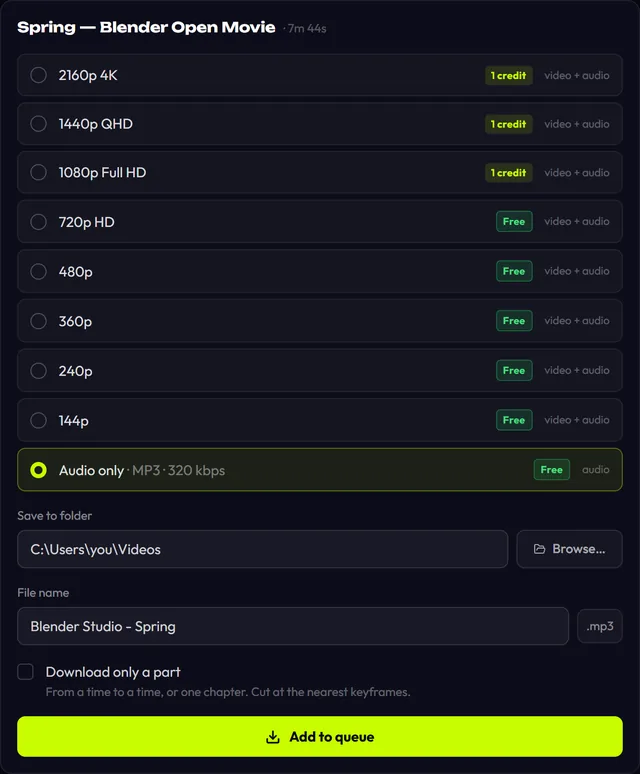
Pick the bottom row, “Audio only · MP3”. It's tagged Free.
- 4
Click Add to queue. The
.mp3lands in your folder with cover art and tags.
If you mostly grab music, set Quick download → “One click downloads” to MP3. The Download button then saves the audio straight away and skips the quality list.
Download Top Video Downloader
Free: 3 downloads without an account, then 10 a day up to 720p, no ads. 4K and unlimited downloads come with a subscription, a lifetime plan or credits.
Top Video Downloader is a desktop app
It runs on Windows, macOS and Linux. Send the link to yourself to open it on your computer, or join the waitlist for a phone version.
Which bitrate to pick: the truth about “320 kbps MP3”
We checked YouTube's format list on 7 October 2026 for Blender's official upload of Big Buck Bunny. The best audio was Opus at about 129 kbps, alongside AAC at about 129 kbps, and nothing higher. Every MP3 is a re-encode of that stream. Picking 320 kbps makes the file about two and a half times bigger and adds nothing the source didn't have.
| Format | What happens | Size per minute | Use it for |
|---|---|---|---|
| MP3 128 kbps | Re-encoded | ≈0.96 MB | Speech, podcasts, saving space |
| MP3 192 kbps | Re-encoded | ≈1.44 MB | Music for phones and car stereos |
| MP3 320 kbps | Re-encoded | ≈2.4 MB | Only when a device insists on 320 |
| MP3 Best | Re-encoded, variable bitrate | Depends on the track | The default |
| Opus | YouTube's stream saved as is, no re-encode | ≈1 MB | Most faithful; VLC, browsers, Android |
| M4A (AAC) | Re-encoded from Opus | Depends on bitrate | Apple devices |
| FLAC | Lossless copy of already-compressed audio | Far larger than MP3 | Editing; no quality gain |
| WAV | Uncompressed PCM, 16-bit / 48 kHz | ≈11.5 MB | Audio editors; no cover art |
The bitrate setting is ignored for FLAC and WAV. It's ignored for Opus too, because when the source is already Opus the engine copies the stream untouched.
Download a whole YouTube playlist as MP3
Paste a playlist (youtube.com/playlist?list=…) or channel link and click Check formats. A list of up to 1000 videos opens. Tick what you want, choose “Audio only (MP3)” under Quality and, if you like, “Save into a folder named after the playlist”. Each track is one download. When your 10 free downloads for the day run out, the queue stops and tells you the rest of the list would use 1 credit each. You decide: “Continue with credits”, or wait until midnight UTC. See playlists and channels.
Want one song from a two-hour mix? Tick “Download only a part” and enter times like 1:02:03, or pick a chapter; see clips. It works with Audio only too.
YouTube to MP3 not working? Common causes
- No “Audio only” row. The link is a playlist or channel, so a list opens and audio is picked under Quality. Now and then a video simply has no audio track.
- Sign-in required. Some music videos are age-restricted. Sign in to YouTube under Platform logins; the session stays encrypted on your PC.
- No cover art in the player. Make sure “Embed the cover image” is on. WAV can't hold a cover, so use MP3 or FLAC.
- The app asks for a credit for audio. Audio is free only within 10 downloads a day; the 11th costs 1 credit.
Online YouTube to MP3 converter vs a desktop app
| Online converter | Top Video Downloader | |
|---|---|---|
| Where it converts | On the service's server | On your own computer |
| Audio source | The same YouTube stream, ≈130 kbps | The same YouTube stream, ≈130 kbps |
| Formats | Depends on the site | MP3, M4A, Opus, FLAC, WAV |
| Whole playlists | Depends on the site | Up to 1000 tracks |
| On a phone | Usually works | No, see downloading on a phone |
Music is almost always copyrighted. Keep only what you have the right to and don't share the files. More in is it legal to download videos.
YouTube to MP3 FAQ
Is YouTube to MP3 free?
Yes. You get 3 trial downloads with no account, and a free account gives you 10 downloads a day. Audio has no quality cap, so even a 320 kbps MP3 counts as a free download. The counter resets at midnight UTC; after that, each download costs 1 credit.
Should I choose 320 kbps MP3?
Usually not. YouTube's best audio in our test was about 129 kbps, so 320 kbps just inflates the file to about 2.4 MB a minute. 192 kbps or Best is plenty for music. Only pick 320 when a player or service demands that exact bitrate.
Which format is closest to the original?
Opus. When YouTube serves Opus audio, the app saves that stream without re-encoding it. MP3 and M4A are re-compressed. FLAC and WAV add no new loss, but they can't undo the loss already in YouTube's stream. Opus plays in VLC, browsers and on Android, though not on every car stereo.
Can I download songs from YouTube Music?
Yes. music.youtube.com/watch?v=… links go through the same engine as regular YouTube. Choose Audio only and the track saves as MP3 with cover art and title. YouTube Music playlists open as a list as well.
How do I cut one song out of a long mix?
In the quality window choose Audio only and tick “Download only a part”. Enter a start and end such as 12:40 and 16:05, or click a chapter if the uploader added them. Only that stretch downloads, and the time range is added to the file name.
Does it work on Mac and Linux?
Yes. There are builds for Windows 10/11, macOS on Apple Silicon Macs (M1 and later) and Linux x86-64. ffmpeg is bundled for the conversion, so there's nothing else to install. There's no build for Intel Macs or for phones.
Read next
- How to download YouTube videos on your PCCopy the video link, paste it into Top Video Downloader, click Check formats and pick a quality. The MP4 lands on your disk. Public videos need no YouTube sign-in. A free account gives you 10 downloads a day up to 720p, MP3 audio included, while 1080p, 1440p and 4K cost 1 credit per video.
- How to download SoundCloud tracks to MP3 on PCTop Video Downloader saves SoundCloud tracks to your computer as MP3, M4A, Opus, FLAC or WAV, with no SoundCloud login. Cover art and title tags are written into the file. Audio-only downloads are free within the daily quota: 10 a day with a free account, or 3 trial downloads without one.
- Download whole playlists, channels and profilesTop Video Downloader 2.0 downloads whole playlists, YouTube channels and TikTok or Instagram profiles to your computer. Paste the link and the app lists up to 1,000 videos; tick all, none or the first N, set one quality cap, and each video counts as one download. Free accounts get 10 a day up to 720p.
- Download only part of a videoTop Video Downloader 2.0 can download just part of a video instead of the whole thing. In the quality picker, tick Download only a part, type a start and end time (90, 1:30 or 1:02:03) or click a chapter. Cuts land on the nearest keyframes with no re-encoding, so the edges can shift by a second or two.
- How to download YouTube Shorts on PCPaste a `youtube.com/shorts/…` link into Top Video Downloader and the Short saves as an MP4, with no YouTube sign-in. Qualities are labeled by frame height, so a Full HD Short (1080×1920) shows as “1920p” and costs 1 credit. Free covers versions up to 720 pixels tall, which means 360×640, plus MP3 audio.
- Is it legal to download videos from YouTube and other sites?Downloading a video isn't automatically legal or illegal: it depends on who owns it, what the site's terms allow and where you live. Your own uploads, public-domain films and Creative Commons videos are generally fine. YouTube's terms forbid downloading without its permission, and sharing someone else's video almost always needs the rights holder's consent.