yt-dlp GUI: yt-dlp with an interface, no command line
Updated October 7, 2026 · tested with version 2.0.0
Top Video Downloader is a yt-dlp GUI for Windows, Apple Silicon Macs and Linux. The installer bundles yt-dlp, ffmpeg and Deno, and yt-dlp updates separately from the app through Ed25519-signed packages. The free plan gives 10 videos a day up to 720p. If you want a free, open-source GUI, Parabolic and Open Video Downloader are good picks.
What yt-dlp is and why people want a GUI for it
yt-dlp is an open-source command-line audio and video downloader, forked from youtube-dl. It supports thousands of sites and is released under the Unlicense. Most of today's downloaders run on it, ours included. We're not affiliated with the yt-dlp project, and we're grateful for its work: this app wouldn't exist without it.
yt-dlp's problem isn't capability, it's the on-ramp. You have to download yt-dlp itself, install ffmpeg separately (without it you can't merge video and audio at 1080p and up), and add a JavaScript runtime such as Deno for full YouTube support. Then you learn syntax like -f "bv*+ba" and -o "%(title)s.%(ext)s" and remember to update whenever a site changes. A GUI hides all of that behind buttons.
How Top Video Downloader runs yt-dlp
- Batteries included. The installer ships yt-dlp 2026.08.19 (the latest stable release as of October 7, 2026), ffmpeg with ffprobe, and Deno 2.9.7. On Windows it also carries an embedded Python for yt-dlp. Nothing else to install.
- yt-dlp updates without a new app release. 20 seconds after launch and then every 6 hours, the app checks our yt-dlp update channel. Each update is a zip signed with Ed25519 over its SHA-256. If the signature doesn't verify, the app keeps using the bundled version.
- Stable releases only. Our pipeline watches upstream yt-dlp stable releases daily and never ships nightly builds.
- Retry when blocked. If a site answers with a 403 or a bot wall, the app retries once with
--impersonate chrome. - Checked every night. The app's engine downloads one video from each of 63 sites nightly, with results on the status page.
August 2026 showed why the separate channel matters: TikTok started refusing yt-dlp's page requests, and every TikTok download failed. We shipped a workaround ahead of the official fix, and now fixes like that can reach users without a full app release. The details are in our write-up of the TikTok outage.
Which yt-dlp options the buttons replace
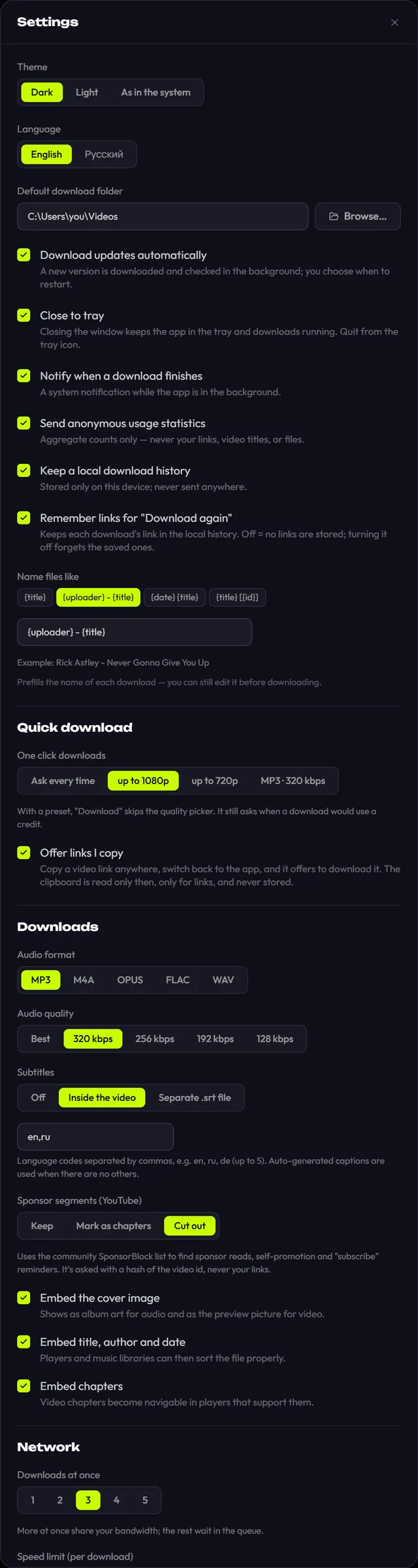
| In yt-dlp | In Top Video Downloader |
|---|---|
--extract-audio --audio-format --audio-quality | Audio: MP3, M4A, Opus, FLAC or WAV at 128–320 kbps or "Best" |
--merge-output-format, --remux-video | MP4 (H.264 + AAC when available), MKV only when MP4 can't hold the source |
--download-sections | Download only a part: by time or chapter |
--sponsorblock-mark all / --sponsorblock-remove | SponsorBlock: Keep, Mark as chapters, or Cut |
--write-subs --write-auto-subs --embed-subs --sub-langs | Subtitles: off, embedded or separate .srt, up to 5 languages |
--embed-thumbnail --embed-metadata --embed-chapters | Cover, title, author, date and chapters inside the file |
--cookies | Sign in to a site in a built-in window; cookies encrypted with AES-256-GCM |
--limit-rate, --proxy | Speed limit and proxy (http, https, socks4/4a/5/5h) |
-o (output template) | Name template with {title}, {uploader}, {date}, {id}, {platform} |
What a GUI adds on top of yt-dlp
- A quality list that shows what's free and what costs a credit before anything downloads.
- Playlists and channels of up to 1000 videos with All / None / First N; import up to 1000 links from a .txt file.
- Subscriptions: new uploads from a channel download on their own every 6 hours.
- A real pause that resumes from the same byte, and recovery of unfinished downloads after a crash.
- Searchable history with "Download again", clipboard link detection, one-click presets.
What a GUI hides: what you give up
- No custom yt-dlp arguments, format codes, codec choice or WebM.
- No browser cookie import (
--cookies-from-browser); you sign in inside the app instead. - No way to plug in your own yt-dlp build, a fork, or nightly versions.
- No drag-and-drop and no browser extension.
- The app itself is closed source; only the installers repository is public.
- Above 720p and beyond 10 videos a day you need a credit or a subscription, while yt-dlp itself is always free.
If you need anything on that list, the honest answer is to use yt-dlp directly or one of the GUIs below.
Other yt-dlp and youtube-dl GUIs for Windows, Mac and Linux
| App | Platforms | Price and licence | Good at |
|---|---|---|---|
| Stacher | Windows, macOS, Linux | Free, no ads; optional Premium via Patreon | Installs yt-dlp and ffmpeg for you, setting profiles, subscriptions, lets you use a yt-dlp fork |
| Parabolic | Linux, Windows, macOS | Free, open source (MIT); release 2026.5.0, May 2026 | Clean interface that fits right in on Linux |
| Open Video Downloader | Windows, macOS, Linux | Free, open source (AGPL-3.0); v3.2.1, July 2026 | Playlists, automatic yt-dlp updates; formerly youtube-dl-gui |
| Tartube | Windows, Linux and others | Free, open source (LGPL-2.1); v2.5.231, May 2026 | Channel and playlist manager with deep settings |
| Seal | Android | Free, open source (GPL-3.0) | yt-dlp on your phone |
| Top Video Downloader | Windows x64, macOS on Apple Silicon, Linux x86-64 | 10 videos a day up to 720p free; credits, subscription or $34.99 lifetime | Everything bundled, signed yt-dlp updates, subscriptions, site logins, nightly site checks |
If you searched for a "youtube-dl GUI for Windows": most front-ends that started on youtube-dl now run on yt-dlp, Open Video Downloader among them. For tools that don't use yt-dlp, such as 4K Video Downloader and JDownloader, see our best video downloaders for PC comparison.
Download Top Video Downloader
Free: 3 downloads without an account, then 10 a day up to 720p, no ads. 4K and unlimited downloads come with a subscription, a lifetime plan or credits.
Top Video Downloader is a desktop app
It runs on Windows, macOS and Linux. Send the link to yourself to open it on your computer, or join the waitlist for a phone version.
Does yt-dlp have an official GUI?
No. yt-dlp is a command-line program and the project has no official interface. Every GUI, including Top Video Downloader, Stacher, Parabolic and Open Video Downloader, comes from third-party developers. They run yt-dlp inside and expose its features through buttons and menus.
Do I need to install ffmpeg separately for Top Video Downloader?
No. The installer already contains yt-dlp, ffmpeg with ffprobe, and Deno, plus an embedded Python on Windows. There is nothing to configure or add to PATH: after installing, the app can download right away, including 1080p and 4K video with sound.
How does Top Video Downloader keep yt-dlp up to date?
Through a separate channel: 20 seconds after launch and then every 6 hours, the app looks for a newer yt-dlp. Each package is signed with Ed25519 over its SHA-256, and if the signature is wrong the bundled version stays in use. We only ship stable yt-dlp releases.
Can I pass my own yt-dlp arguments to Top Video Downloader?
No. The app builds the command from its settings: quality, audio, subtitles, SponsorBlock, clips, name template, proxy and speed limit. Custom arguments, format codes, WebM and browser cookie import aren't available. If you need them, use yt-dlp directly.
Is Top Video Downloader open source?
No. The app's source code is closed; only the installers repository on GitHub is public. It runs the open-source yt-dlp inside, but the GUI itself is proprietary. If open source is a must for you, choose Parabolic, Open Video Downloader or Tartube.
Only download what you have the right to: is it legal to download videos?
Read next
- Best video downloaders for PC in 2026There is no single best video downloader for PC. yt-dlp is free and the most flexible, but it is a command-line tool. 4K Video Downloader Plus is polished, but its free tier is limited. Top Video Downloader 2.0 (our app) wraps yt-dlp in a desktop app: 10 free downloads a day up to 720p, plus playlists and channel subscriptions.
- How to verify Top Video Downloader and get past SmartScreenWindows SmartScreen and macOS Gatekeeper warn about Top Video Downloader because its installers are not code-signed yet, not because a threat was found. You can confirm the file is the one we published by comparing its SHA-256 checksum with SHA256SUMS on the GitHub release. In-app updates are checked automatically with an Ed25519 signature.
- Download whole playlists, channels and profilesTop Video Downloader 2.0 downloads whole playlists, YouTube channels and TikTok or Instagram profiles to your computer. Paste the link and the app lists up to 1,000 videos; tick all, none or the first N, set one quality cap, and each video counts as one download. Free accounts get 10 a day up to 720p.
- SponsorBlock: download YouTube videos without sponsor segmentsTop Video Downloader 2.0 can strip sponsor reads that creators record into their YouTube videos from the files you download. Using the community SponsorBlock database, it cuts sponsor segments, self-promotion and like-and-subscribe reminders, or marks them as chapters instead. It works on YouTube only and is off by default.
- Download only part of a videoTop Video Downloader 2.0 can download just part of a video instead of the whole thing. In the quality picker, tick Download only a part, type a start and end time (90, 1:30 or 1:02:03) or click a chapter. Cuts land on the nearest keyframes with no re-encoding, so the edges can shift by a second or two.
- The August 2026 TikTok outage: what broke and how we fixed itFrom August 10, 2026, every TikTok download in Top Video Downloader failed with "The download failed for an unknown reason": TikTok's bot protection started serving a block page to the download engine. Version 0.1.4 fixed it on August 17 by sending an ordinary Referer header, and 0.1.5 later shipped the official yt-dlp fix as well.