Download whole playlists, channels and profiles
Updated October 7, 2026 · tested with version 2.0.0
Top Video Downloader 2.0 downloads whole playlists, YouTube channels and TikTok or Instagram profiles to your computer. Paste the link and the app lists up to 1,000 videos; tick all, none or the first N, set one quality cap, and each video counts as one download. Free accounts get 10 a day up to 720p.
- Opens as a list
- YouTube playlists and channels, TikTok profiles, Instagram profiles (login needed)
- List size
- up to 1,000 videos per link; Instagram profiles up to 300 video posts
- Your own list
- a .txt file (also .csv, .list, .m3u) or several links pasted at once, up to 1,000 links and 2 MB
- Cost
- one download per video; 1 credit each above 720p; unlimited on a subscription or lifetime plan
- At the same time
- 1 to 5 downloads (3 by default); the rest wait in line
How to download a YouTube playlist or channel, step by step
- 1
Paste a playlist link (
youtube.com/playlist?list=…) or a channel link (youtube.com/@name) into the app's address bar. - 2
Click Download. Instead of the quality picker you get a list of videos with titles and lengths, in seconds even for a big channel.
- 3
Tick what you want: All, None, or a number in First (it starts at 10) followed by Select. Rows can be ticked by hand too.
- 4
Choose one quality cap for the whole list, from up to 2160p down to 360p, or audio only. Each option shows a Free or 1 credit badge.
- 5
Pick a folder. Save into a folder named after the playlist puts the files in their own subfolder.
- 6
Click Add N to queue. The videos start as slots in the queue free up.
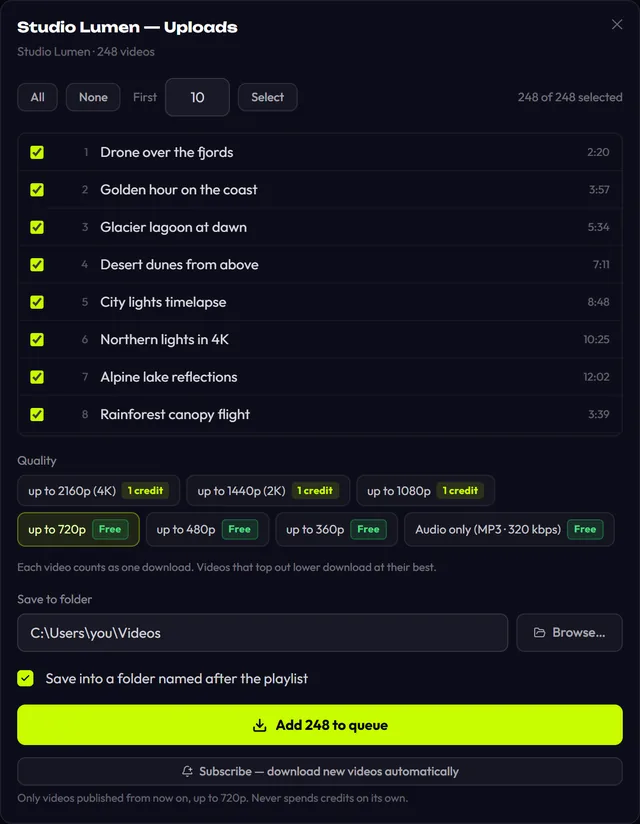
Paste a video opened from inside a playlist (the address has &list=) and you get the normal picker for that video, plus a link to show the whole playlist. Handy when you want one episode, not the season.
Which links open as a list?
| Link | Example | What you get |
|---|---|---|
| YouTube playlist | youtube.com/playlist?list=PL… | Every video in the playlist, in order |
| Video inside a playlist | youtube.com/watch?v=…&list=… | That video, plus an offer to open the whole playlist |
| YouTube channel | youtube.com/@name | Videos, Shorts and Live tabs as one list, each row tagged |
| Channel uploads only | youtube.com/@name/videos | Just the Videos tab, no Shorts or streams |
| TikTok profile | tiktok.com/@name | The profile's videos |
| Instagram profile | instagram.com/name/ | Up to 300 video posts; Instagram login required |
| Your own list | a .txt file or several pasted links | Up to 1,000 links from any supported site |
For your own list, use Import a list of links (.txt) next to the address bar. The app takes every distinct http(s) link in the file and ignores the other text, so an exported notes file works.
How many credits does a playlist use?
Every video in the list is its own download. Quality is a ceiling: with "up to 1080p", a video that only exists in 720p downloads in 720p. The ceiling is what gets reserved and charged, so the app defaults to the best cap that costs you nothing (720p on a free account, 1080p on a subscription). Pick a paid cap and it spells out the cost, for example "20 videos × 1 credit = up to 20 credits".
| Account | Up to 720p and audio | Above 720p (1080p, 2K, 4K) |
|---|---|---|
| No account | 3 trial downloads in total; after the third the list stops and asks you to sign up | — |
| Free account | 10 videos a day free, then 1 credit each, only after you agree | 1 credit per video; 4K costs the same as 1080p |
| Subscription or lifetime | Unlimited | Unlimited |
A list never spends credits behind your back
If your 10 free downloads run out halfway, the rest of the list pauses and you choose: Continue with credits or Cancel waiting. The daily count resets at midnight UTC. Credit prices are on the pricing page.
What a playlist looks like in the queue
A list doesn't start all at once. The app runs as many downloads as set in Settings (1 to 5, 3 by default), and the queue shows "N more waiting — they start as downloads finish". Each video is reserved just before it starts, and a failed or cancelled download gives its reservation back.
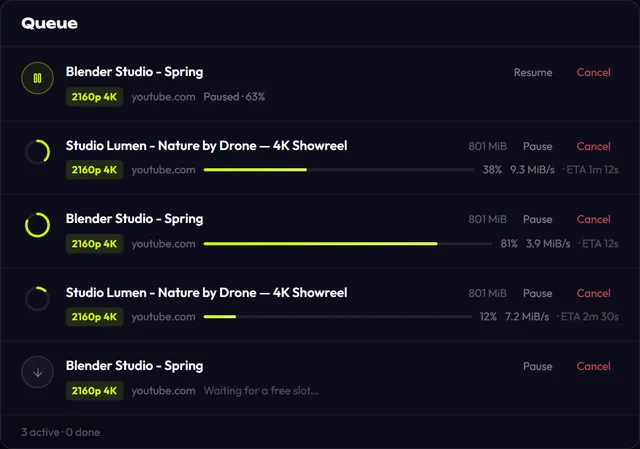
Any row can be paused; Resume picks up from the same byte while the next video takes the free slot. If the app closes or crashes mid-list, the next launch offers to resume. In the background you get one "20 downloads finished" notification, not twenty.
Download Top Video Downloader
Free: 3 downloads without an account, then 10 a day up to 720p, no ads. 4K and unlimited downloads come with a subscription, a lifetime plan or credits.
Top Video Downloader is a desktop app
It runs on Windows, macOS and Linux. Send the link to yourself to open it on your computer, or join the waitlist for a phone version.
Limits worth knowing before you start
- 1,000 videos per link. For bigger channels the app says "Showing the first 1000 — the list is longer." Get the rest through the channel's playlists.
- Instagram profiles need a login. The app lists up to 300 video posts through Instagram's web interface with your saved login, pausing between pages to go easy on the account. Single posts and Reels work without one. This is new and wasn't tested on live accounts before launch.
- Private playlists and members-only videos need your login to that site under Platform logins. Those cookies stay encrypted on your PC.
- No clips in lists. Cutting by time is a single-video feature.
- Desktop only: Windows, macOS on Apple Silicon, Linux x86-64.
Want new uploads to arrive on their own? Use the Subscribe button under the list; see subscriptions. Only download what you have the right to; see is it legal to download videos.
Can I download an entire YouTube channel with one link?
Yes, up to 1,000 videos at a time. Paste a youtube.com/@name link and the app merges the Videos, Shorts and Live tabs into one list. For regular uploads only, use youtube.com/@name/videos. For channels with more than 1,000 videos the app tells you the list was cut.
How much does it cost to download a 50-video playlist?
At up to 720p on a free account it costs nothing, but only 10 videos a day are free, so the app asks before using credits on the other 40. At 1080p or higher each video is 1 credit, so up to 50 credits. A subscription or lifetime plan has no limit.
How do I download only the latest 10 videos from a channel?
Open the channel and click Select next to the First field, which starts at 10. That ticks the top ten rows. YouTube's Videos tab is normally sorted newest first, so with a youtube.com/@name/videos link those are usually the ten most recent uploads. Change the number for more or fewer.
Can I download a whole playlist as MP3?
Yes. The list's quality options include audio only, which is free within your daily quota. The format comes from Settings: MP3 by default, or M4A, Opus, FLAC or WAV, at 128 to 320 kbps or best VBR. The YouTube to MP3 guide covers the audio settings in detail.
Does it download playlists from sites other than YouTube?
Yes, where the site exposes a list: TikTok and Instagram profiles work this way. For anything else, paste several links at once or import a .txt file of up to 1,000 links. We check 63 platforms every day; results are on the status page.
Read next
- Subscriptions: auto-download new videos from a channelA subscription in Top Video Downloader 2.0 downloads a channel's, playlist's or profile's new videos to your computer on its own. The app checks each subscription every 6 hours while it's running (including from the tray), queues up to 20 new videos per check, and never spends credits by itself.
- Download only part of a videoTop Video Downloader 2.0 can download just part of a video instead of the whole thing. In the quality picker, tick Download only a part, type a start and end time (90, 1:30 or 1:02:03) or click a chapter. Cuts land on the nearest keyframes with no re-encoding, so the edges can shift by a second or two.
- How to download YouTube videos on your PCCopy the video link, paste it into Top Video Downloader, click Check formats and pick a quality. The MP4 lands on your disk. Public videos need no YouTube sign-in. A free account gives you 10 downloads a day up to 720p, MP3 audio included, while 1080p, 1440p and 4K cost 1 credit per video.
- Top Video Downloader pricingTop Video Downloader is free for 10 downloads a day up to 720p with an account, plus 3 trial downloads without one. For 1080p, 4K or more downloads, buy credits (1 credit = 1 video at any quality, $4.99 for 10), a subscription from $4.99 a month, or lifetime for $34.99. Crypto only, no auto-renewal.
- Top Video Downloader changelogThis page lists every published version of Top Video Downloader with its date and changes. The app checks for updates on launch, downloads them in the background and verifies the signature before installing, so updating is usually one click on Restart.