4K Video Downloader alternative: Top Video Downloader compared
Updated October 7, 2026 · tested with version 2.0.0
If 4K Video Downloader Plus's free tier runs out too fast, Top Video Downloader 2.0 has a published limit: 10 free downloads a day up to 720p, 1080p or 4K for one credit, playlists of up to 1000 videos and free channel subscriptions. 4K Video Downloader still wins on Intel Macs, Android and paying without crypto.
Full disclosure
We make Top Video Downloader, so we have a stake in this comparison. Facts about 4K Video Downloader Plus come from the official 4kdownload.com site as of October 7, 2026, where prices were shown to us in euros. If anything has changed since, the vendor's site wins.
4K Video Downloader vs Top Video Downloader: side by side
| Top Video Downloader 2.0 | 4K Video Downloader Plus | |
|---|---|---|
| Free | 10 downloads/day up to 720p with a free account; 3 trial downloads without one | Permanent Starter plan "with quantity limitations"; exact numbers not published |
| Subscription | $4.99 for 1 month, $12.99 for 3, $19.99 for 6, $27.99 for 12; 2 computers | Lite: €18.15/year, 1 computer |
| Lifetime | $34.99 for 2 computers, $59.99 family plan for 3 | Personal €30.25 for 3 computers; Pro €64.53 (on sale at €48.40 when checked) for 3 computers, commercial use allowed |
| Pay as you go | Credits: 10 for $4.99, 50 for $14.99, 100 for $24.99; 1 credit = 1 video at any quality, never expire | None |
| Playlists and channels | Up to 1000 videos per link, All / None / First N picker; import links from a .txt file | Unlimited on paid plans |
| Auto-download new uploads | Subscriptions on every plan, checked every 6 hours, never spend credits | YouTube subscriptions on Pro only |
| Subtitles | Embedded or separate .srt, up to 5 languages, auto-captions as a fallback | Yes, 50+ languages |
| Simultaneous downloads | 1 to 5, default 3 | 3 on Lite and Personal, up to 7 on Pro |
| Quality and formats | Up to 4K and beyond where the source has it; MP4 (MKV when needed); audio MP3, M4A, Opus, FLAC, WAV | Up to 8K; MP4 and MKV; audio MP3, M4A, OGG |
| Operating systems | Windows x64, macOS on Apple Silicon, Linux x86-64 (AppImage, deb) | Windows 10/11 64-bit, macOS 12+ on Intel and Apple Silicon, Ubuntu 22.04+ (GNOME) |
| Mobile | No, desktop only | Separate Android app |
| Ads | None on any plan | Ad-free on Personal and Pro only |
| Private videos | Sign in to the site inside the app; cookies encrypted on your PC | Private content access on Personal and Pro only |
| Payment | Crypto only (USDT on TRC-20 by default), no auto-renewal | Online store; prices were shown to us in euros |
| Refunds | Generally non-refundable; by agreement for service faults or duplicate payments | 14-day return on online purchases; full refund for software errors, duplicate purchases or activation issues |
Free limits: a published number vs "quantity limitations"
Most people searching for a 4K Video Downloader alternative have hit the Starter plan's limits. The vendor calls them "quantity limitations" and does not publish the numbers, so it's hard to know up front whether they'll be enough. Ours are written down: 3 trial downloads without an account, then 10 downloads a day up to 720p with a free account, resetting on the UTC date. Audio-only downloads count within those 10 free ones.
Above 720p you need a credit or a subscription. One credit is one video at any quality, so 4K costs the same as 1080p. Credits never expire, and a failed or cancelled download gives the credit back. That suits someone who wants five 4K videos a month rather than a yearly plan.
Playlists, channels and subscriptions: where the gap is biggest
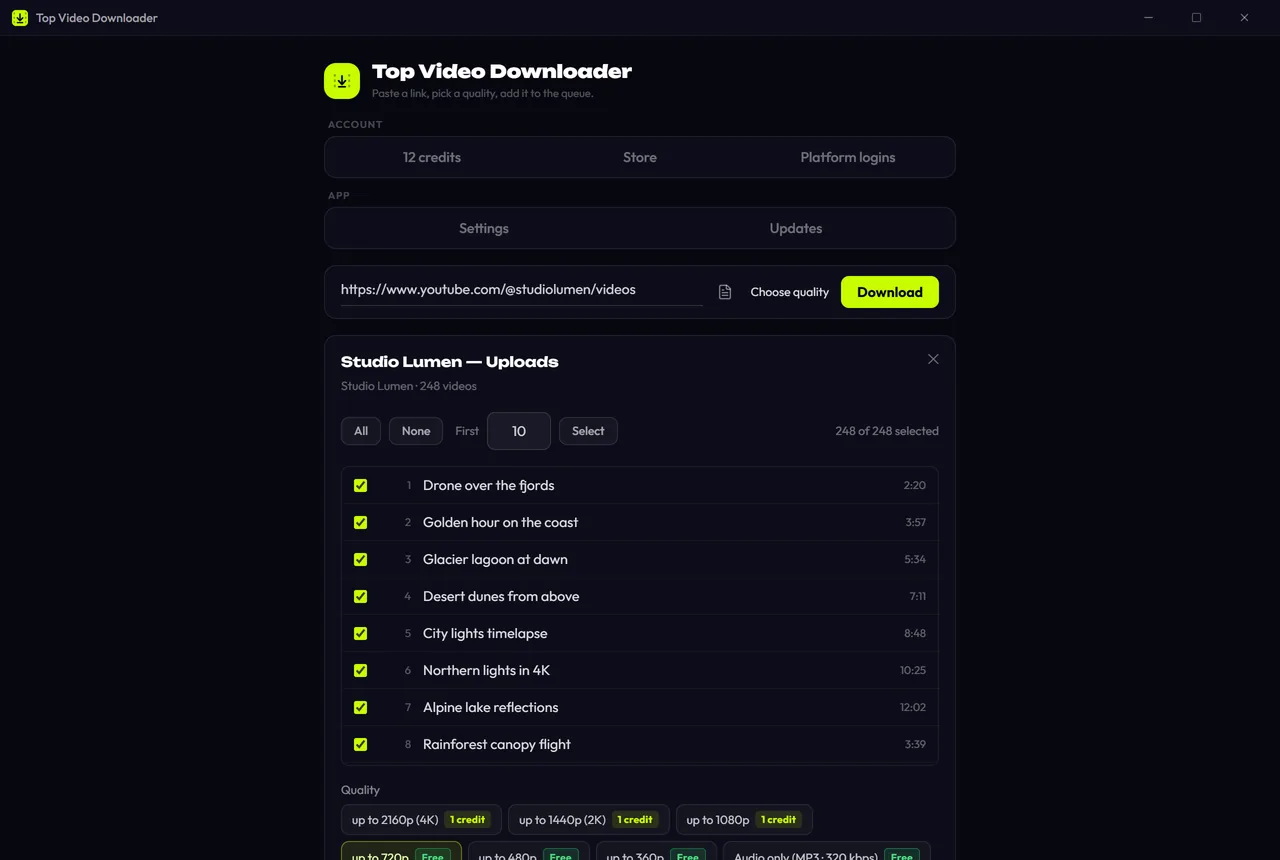
In 4K Video Downloader Plus, unlimited playlist and channel downloads come with the paid plans, and auto-downloading new uploads from YouTube channels is a Pro feature. In Top Video Downloader 2.0, playlists and channels work on every plan: a link opens a list of up to 1000 videos. If your free quota runs out mid-list, the app pauses and asks before spending credits. It never spends them silently.
Subscriptions work on every plan and never spend credits. The app checks them every 6 hours while it's running (including from the tray) and downloads only videos published after you subscribed, up to 20 new ones per check. You can subscribe to a YouTube channel, a playlist or an Instagram profile.
Supported sites: both do YouTube, only one lists VK and Rutube
The 4K Video Downloader Plus product page names YouTube, Vimeo, TikTok, SoundCloud, Bilibili, Flickr, Facebook, Dailymotion, Naver TV and Tumblr, plus recorded Twitch streams. VK Video, Rutube, OK and Dzen aren't on that list. Our app checks 63 sites every night, including those, and publishes the result on the status page. Not all 63 pass every night, because sites change, and the page shows that openly.
Privacy and payment
- Where files go: videos download from the site straight to your PC and never pass through our server. The server stores your email, a random device ID, your balance and purchase records, but not links or video titles.
- Telemetry: anonymous and can be turned off in Settings; it never sends links, titles or files.
- Site logins: cookies are encrypted with AES-256-GCM, the key lives in your OS keystore, and cookies are never sent to our server.
- Payment: crypto only, no auto-renewal, prices in US dollars. If you don't hold crypto and don't want to, 4K Video Downloader's regular online store is the easier route.
When 4K Video Downloader is the better choice
- You have an Intel Mac. 4K Video Downloader Plus has an x64 build for macOS 12 and later; we ship for Apple Silicon only.
- You need Android. They have a separate app; ours is desktop-only. See what works on phones on our mobile page.
- You'd rather not pay with crypto and want a clear refund window. 4K Video Downloader sells through a regular online store with published refund rules; we take crypto only and refund by agreement.
- Three computers for one payment. Personal covers 3 computers; for 3 computers we need the $59.99 family plan.
- Commercial use, up to 7 parallel downloads or AI audio tools. Those come with Pro.
- You want a code-signed app. Our installers aren't code-signed, so Windows shows a SmartScreen warning; the verify page explains how to check the SHA-256 checksum.
When Top Video Downloader is the better choice
- You want free downloads with a clear limit: 10 a day up to 720p.
- You need 1080p or 4K now and then without a subscription: credits from $0.25 to $0.50 each, and they don't expire.
- You want channel auto-downloads without buying the top tier.
- You download from VK, Rutube, OK, Dzen or other sites.
- You want clips, SponsorBlock, pause and resume from the same byte, or Linux packages as .deb or AppImage.
Download Top Video Downloader
Free: 3 downloads without an account, then 10 a day up to 720p, no ads. 4K and unlimited downloads come with a subscription, a lifetime plan or credits.
Top Video Downloader is a desktop app
It runs on Windows, macOS and Linux. Send the link to yourself to open it on your computer, or join the waitlist for a phone version.
How many videos can I download for free with 4K Video Downloader?
The official 4K Video Downloader Plus site describes the free Starter plan as having "quantity limitations" and doesn't publish the exact numbers. Top Video Downloader gives 10 free downloads a day up to 720p with a free account, plus 3 trial downloads without one. The daily counter resets on the UTC date.
Which is cheaper, 4K Video Downloader or Top Video Downloader?
It depends on how you download. For one computer for a year, Lite at €18.15 is cheaper than our 12-month subscription at $27.99, which covers 2 computers. If you only need a few 4K videos a month, our credits at $0.25 to $0.50 each cost less. Lifetime: Personal at €30.25 for 3 computers vs our $34.99 for 2.
Is Top Video Downloader available for Mac?
Yes, but only for Apple Silicon Macs (M1 and later). There is no Intel Mac build. If you have an Intel Mac, 4K Video Downloader Plus or yt-dlp will serve you better. We also ship for Windows x64 and Linux x86-64.
Can I move my 4K Video Downloader license to Top Video Downloader?
No. They are separate apps from different developers, and licenses don't transfer. You can try our free account instead: 10 downloads a day up to 720p, no card and no trial countdown. If it isn't for you, you've lost nothing.
Does Top Video Downloader download 8K video?
If the source offers 8K, the app lists it in the quality picker and downloads it for one credit, the same as 4K. Few videos are published in 8K. The site always sets the maximum: the app downloads what the site serves and never upscales.
Only download what you have the right to: is it legal to download videos?
Read next
- Best video downloaders for PC in 2026There is no single best video downloader for PC. yt-dlp is free and the most flexible, but it is a command-line tool. 4K Video Downloader Plus is polished, but its free tier is limited. Top Video Downloader 2.0 (our app) wraps yt-dlp in a desktop app: 10 free downloads a day up to 720p, plus playlists and channel subscriptions.
- Top Video Downloader pricingTop Video Downloader is free for 10 downloads a day up to 720p with an account, plus 3 trial downloads without one. For 1080p, 4K or more downloads, buy credits (1 credit = 1 video at any quality, $4.99 for 10), a subscription from $4.99 a month, or lifetime for $34.99. Crypto only, no auto-renewal.
- Download whole playlists, channels and profilesTop Video Downloader 2.0 downloads whole playlists, YouTube channels and TikTok or Instagram profiles to your computer. Paste the link and the app lists up to 1,000 videos; tick all, none or the first N, set one quality cap, and each video counts as one download. Free accounts get 10 a day up to 720p.
- Subscriptions: auto-download new videos from a channelA subscription in Top Video Downloader 2.0 downloads a channel's, playlist's or profile's new videos to your computer on its own. The app checks each subscription every 6 hours while it's running (including from the tray), queues up to 20 new videos per check, and never spends credits by itself.
- How to download 4K videos on your PCPaste the link into Top Video Downloader and pick “2160p (4K)”, which appears whenever the site has the video in 4K. A 4K download costs 1 credit, exactly like 1080p, and is unlimited with a subscription or lifetime license. The free plan stops at 720p. YouTube 4K usually saves as MKV, since YouTube only serves AV1 or VP9.
- yt-dlp GUI: yt-dlp with an interface, no command lineTop Video Downloader is a yt-dlp GUI for Windows, Apple Silicon Macs and Linux. The installer bundles yt-dlp, ffmpeg and Deno, and yt-dlp updates separately from the app through Ed25519-signed packages. The free plan gives 10 videos a day up to 720p. If you want a free, open-source GUI, Parabolic and Open Video Downloader are good picks.