How to download Vimeo videos on PC
Updated October 7, 2026 · tested with version 2.0.0
Top Video Downloader saves public Vimeo videos to your PC without signing in: paste the link, pick a quality, and you get an MP4 (MKV when needed) up to 4K when the creator uploaded 4K. Private videos need your own Vimeo login inside the app, and password-protected videos are not supported.
- Works without login?
- Public videos: yes. Private videos: only through your own Vimeo login
- Max quality
- Whatever Vimeo serves for that video, up to 2160p (4K) if the creator uploaded 4K
- Formats
- MP4 (H.264 + AAC when available), MKV as a fallback; audio as MP3, M4A, Opus, FLAC or WAV
- Free plan
- 3 trial downloads with no account; a free account gets 10 a day up to 720p
- Runs on
- Windows 10/11, macOS on Apple Silicon, Linux x86-64
Which Vimeo videos can you download?
On Vimeo, the creator's privacy setting decides more than the downloader does. Here is how Top Video Downloader handles each one:
| Video type | Downloads? | What you need |
|---|---|---|
| Public | Yes | Just the link, e.g. vimeo.com/123456789 |
| Unlisted | Yes, with the full link | The whole link including the code after the second slash: vimeo.com/123456789/abcdef1234 |
| Private, shared with specific accounts | Only with access | Log in to Vimeo under Platform logins with the account the video is shared with |
| Password-protected | No | The app has no field for a video password |
| Vimeo On Demand and other paid videos | No bypass | The app does not get around payment; DRM-protected content is not supported |
| Embedded on another website | Usually | Use the player link player.vimeo.com/video/123456789; if the owner limited playback to their own site, it may fail |
How to download a Vimeo video step by step
- 1
Copy the video link from the address bar or the Share button. For an unlisted video, copy the full link.
- 2
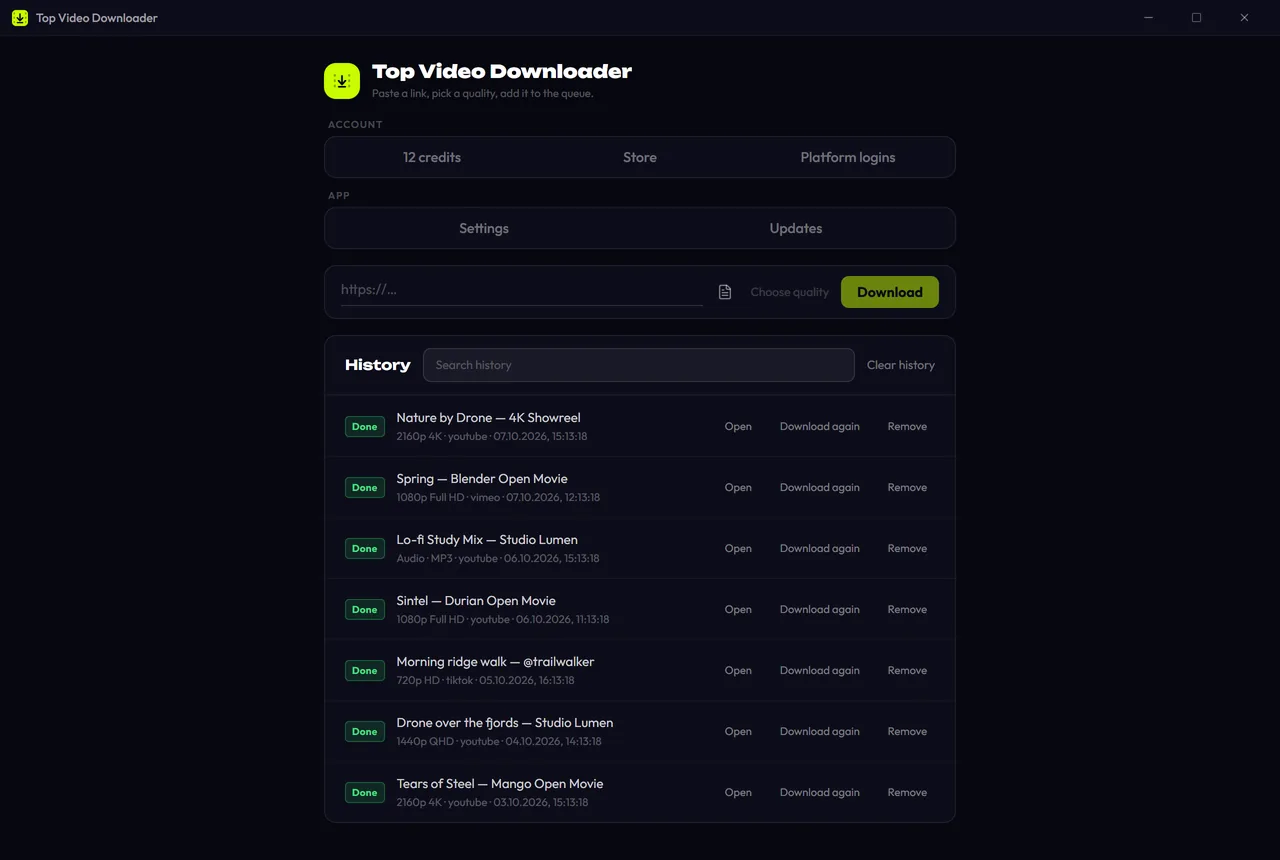
Open Top Video Downloader. If "Offer links I copy" is on in Settings, a "Link copied" banner appears when you switch back to the app. Click Download or Check formats.
- 3
No banner? Paste the link into the
https://…field and click Choose quality. - 4
In Available formats, pick a height. 720p and lower are marked Free; 1080p, 1440p and 2160p show "1 credit". Audio only saves just the soundtrack.
- 5
Check the folder and the file name (the video title by default), then click Add to queue.
- 6
When the queue row says Done, click Open. The file is already on your disk.
Download Top Video Downloader
Free: 3 downloads without an account, then 10 a day up to 720p, no ads. 4K and unlimited downloads come with a subscription, a lifetime plan or credits.
Top Video Downloader is a desktop app
It runs on Windows, macOS and Linux. Send the link to yourself to open it on your computer, or join the waitlist for a phone version.
Which Vimeo links work?
vimeo.com/123456789: the normal video page.vimeo.com/123456789/abcdef1234: an unlisted video. The code after the slash is required.player.vimeo.com/video/123456789: the embedded player link. It sits in the page source wherever the video is embedded.vimeo.com/channels/name/123456789andvimeo.com/showcase/…: videos inside a channel or showcase. When a link opens a list, version 2.0 shows the whole list and you tick what you want. See playlists and channels.
Vimeo download quality and formats
Vimeo stores video and audio as separate streams. The app fetches both, prefers H.264 and AAC, and merges them into one MP4 with the bundled ffmpeg. If the source codec can't go into MP4, you get an MKV instead. The quality list is exactly what Vimeo has for that video: if the creator uploaded 1080p, there is no 4K row.
| Quality | Cost | Notes |
|---|---|---|
| 2160p (4K) | 1 credit or a subscription | Only if the creator uploaded 4K; it costs the same as 1080p |
| 1440p, 1080p | 1 credit or a subscription | The most common top quality on Vimeo |
| 720p and lower | Free, within 10 downloads a day | Needs a free account; without one you get 3 trial downloads |
| Audio only | Free within the daily quota | MP3 by default; M4A, Opus, FLAC and WAV in Settings |
Long webinars and lectures? Tick "Download only a part", enter a start and end time or pick a chapter, and only that section is downloaded. See how clips work.
Vimeo download not working? Common fixes
"Sign-in required" on a public video
Vimeo sometimes asks for a login even on an open video page. Our server check sees this with vimeo.com/<id> links, while the player link player.vimeo.com/video/<id> with the same number goes through. Try that link first. The other fix: Platform logins → Vimeo → Log in, then Save login.
The video asks for a password
You can't enter a video password in the app, so these videos won't download. If it's your own video, turn on downloads in its Vimeo settings or remove the password for a moment.
A private video still fails after logging in
You need to be logged in with the account the video was shared with. If the session is old, click Re-login. When saved cookies stop working, the app retries without them on its own, so public videos keep downloading.
"Site changed"
This means Vimeo changed its pages and the yt-dlp engine doesn't understand them yet. In 2.0, yt-dlp updates arrive separately from app updates and are checked against a signature. For the current state of each site, see the status page.
Vimeo's download button, online sites, or a desktop app?
If the creator turned on downloads, the button on Vimeo is the cleanest option: you get the file from its owner. Online "paste a link" sites are often ad-heavy and don't always give you 1080p with sound. A desktop app merges the best streams, queues several videos and sends nothing through a third-party server. Full comparison: online downloader vs desktop app.
Only download videos you have the right to, and follow Vimeo's terms. More in is it legal to download videos.
Can I download Vimeo videos without an account?
Yes. Public Vimeo videos download without a Vimeo login, and you don't need a Top Video Downloader account for the first 3 trial downloads. After that, a free account gives 10 downloads a day up to 720p. 1080p and 4K take a credit or a subscription.
How do I download a private Vimeo video?
Only if the video is shared with your account. Log in to Vimeo under Platform logins, click Save login, and paste the link again. The cookies are encrypted on your computer and never sent to our server. Someone else's private video can't be downloaded without access.
Can it download password-protected Vimeo videos?
No. The app has no field for a per-video password, so videos that ask for one won't download, even if you know the password. If you own the video, turn on downloads in its Vimeo settings, or remove the password while you download it and put it back afterwards.
Can I download Vimeo videos in 4K?
Yes, when the creator uploaded 4K: the quality list then shows a 2160p 4K row. It costs 1 credit, the same as 1080p, or is included in a subscription. If there is no 4K row, Vimeo doesn't have 4K for that video, and no downloader can add it.
How do I convert a Vimeo video to MP3?
Pick Audio only in the quality list. It saves MP3 by default; in Settings you can switch to M4A, Opus, FLAC or WAV and choose 128 to 320 kbps or Best. An audio-only download is free within your daily quota, and the cover and title are written into the file.
Is there a Vimeo downloader for Android or iPhone?
Top Video Downloader is a desktop app for Windows, macOS on Apple Silicon and Linux. There is no mobile app yet. For what you can do from a phone today and how to join the mobile waitlist, see video downloading on mobile.
Read next
- How to download YouTube videos on your PCCopy the video link, paste it into Top Video Downloader, click Check formats and pick a quality. The MP4 lands on your disk. Public videos need no YouTube sign-in. A free account gives you 10 downloads a day up to 720p, MP3 audio included, while 1080p, 1440p and 4K cost 1 credit per video.
- How to download 4K videos on your PCPaste the link into Top Video Downloader and pick “2160p (4K)”, which appears whenever the site has the video in 4K. A 4K download costs 1 credit, exactly like 1080p, and is unlimited with a subscription or lifetime license. The free plan stops at 720p. YouTube 4K usually saves as MKV, since YouTube only serves AV1 or VP9.
- Download whole playlists, channels and profilesTop Video Downloader 2.0 downloads whole playlists, YouTube channels and TikTok or Instagram profiles to your computer. Paste the link and the app lists up to 1,000 videos; tick all, none or the first N, set one quality cap, and each video counts as one download. Free accounts get 10 a day up to 720p.
- Download only part of a videoTop Video Downloader 2.0 can download just part of a video instead of the whole thing. In the quality picker, tick Download only a part, type a start and end time (90, 1:30 or 1:02:03) or click a chapter. Cuts land on the nearest keyframes with no re-encoding, so the edges can shift by a second or two.
- Online video downloader vs desktop appAn online downloader is fine for one short clip: nothing to install, and it works on a phone. A desktop app such as Top Video Downloader is better when you want 1080p or 4K with sound, whole playlists, videos behind a login and no ads. Here is how the two compare on quality, safety, privacy, batch downloads and speed.
- Is it legal to download videos from YouTube and other sites?Downloading a video isn't automatically legal or illegal: it depends on who owns it, what the site's terms allow and where you live. Your own uploads, public-domain films and Creative Commons videos are generally fine. YouTube's terms forbid downloading without its permission, and sharing someone else's video almost always needs the rights holder's consent.