Facebook video downloader for PC: save videos and Reels
Updated October 7, 2026 · tested with version 2.0.0
Top Video Downloader saves Facebook videos and Reels to your PC from a link, as MP4 or audio-only MP3. Only some public videos open without a login, so for most of them you sign in to Facebook once inside the app. The login is encrypted and kept on your computer; it never reaches our servers.
- Facebook login
- Needed for most videos; some public ones work without it
- What you can save
- Page and profile videos, Watch, Reels, group videos your account can see
- Quality
- The versions Facebook serves; each marked Free or 1 credit
- Formats
- MP4 (H.264 + AAC where available), MKV as a fallback; audio as MP3, M4A, Opus, FLAC, WAV
- Free plan
- 3 trial downloads without an account, then 10 a day up to 720p
- Works on
- Windows 10/11, macOS on Apple Silicon, Linux x86-64
How to download Facebook videos on PC
- 1
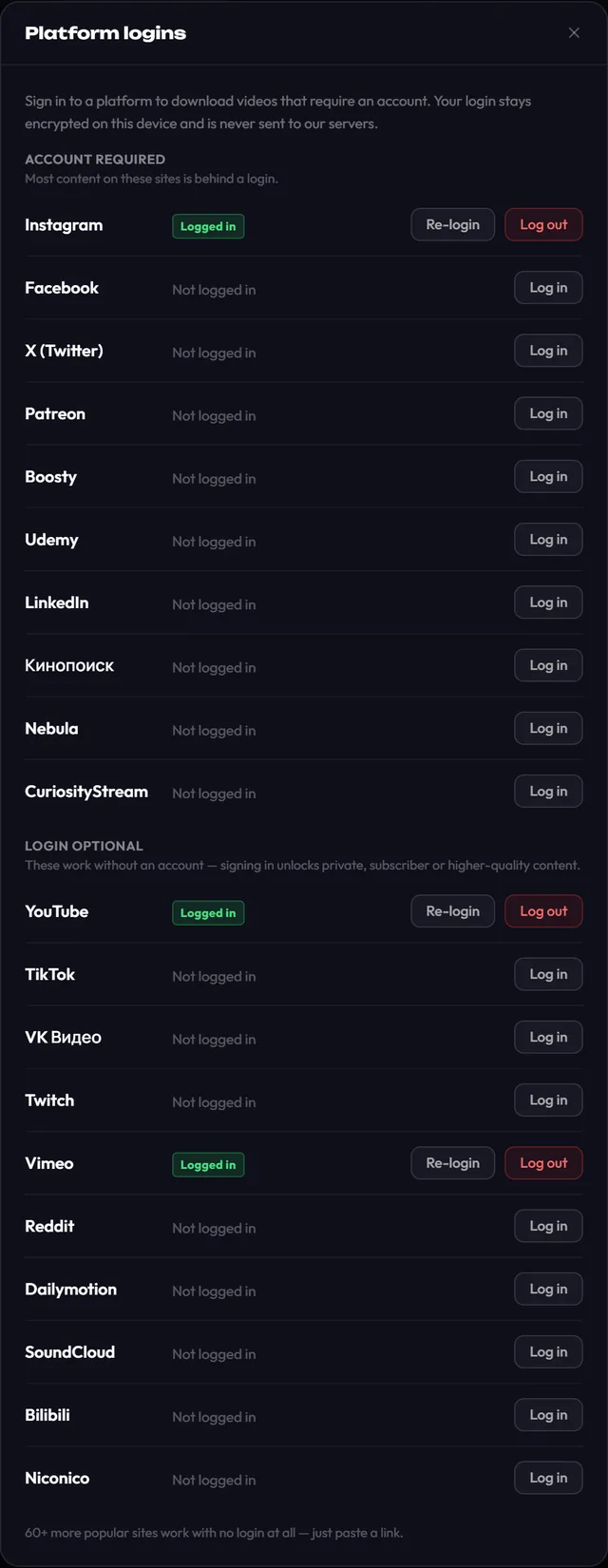
Sign in once. On the main screen click Platform logins, then Log in next to Facebook. Facebook's own login page opens; sign in, confirm it's you if Facebook asks, then click Save login.
- 2
Copy the video link: the page address in your browser, or Share → Copy link in the Facebook app.
- 3
Paste it into Top Video Downloader and click Check formats.
- 4
Choose a quality, or Audio only for MP3, and click Add to queue.
Download Top Video Downloader
Free: 3 downloads without an account, then 10 a day up to 720p, no ads. 4K and unlimited downloads come with a subscription, a lifetime plan or credits.
Top Video Downloader is a desktop app
It runs on Windows, macOS and Linux. Send the link to yourself to open it on your computer, or join the waitlist for a phone version.
Which Facebook videos need a login?
| Video | Without login | With your login in the app |
|---|---|---|
| Public page video, or an ad from the Meta Ad Library | Often yes | Yes |
| Reels and most feed videos | Usually no | Yes |
| Video in a private group | No | If you're a member |
| Friends-only video | No | If your account can see it |
A public Meta Ad Library link is exactly what our daily check uses to test Facebook without a login. Most ordinary links hit a login wall, and the app shows "Sign-in required". That is why Facebook sits in the Account required group of Platform logins, next to Instagram and X.
Facebook link formats that work
| Link | What it is |
|---|---|
facebook.com/watch/?v=… | A video from Facebook Watch |
facebook.com/pagename/videos/… | A video on a page or profile |
facebook.com/reel/… | A Facebook Reel |
fb.watch/… | The short link from the Share button |
facebook.com/ads/library/?id=… | An ad in the Meta Ad Library |
The app attaches your saved login to links on facebook.com and fb.watch. If a link went through some other URL shortener, open it in your browser first and paste the final facebook.com address, so the app recognises Facebook and uses your login.
Your Facebook login stays on your PC
You type your password on Facebook's own page, in a window inside the app. Only the session cookies are kept, encrypted with AES-256-GCM, with the key in Windows Credential Manager, the macOS Keychain or Secret Service on Linux. They are never sent to our servers, and Log out deletes them. The video itself also travels from Facebook straight to your computer, not through us. Want to check any downloader before trusting it? See how to tell a safe video downloader.
Facebook video download not working? Common fixes
- "Sign-in required" even though you signed in: Facebook ended the session, for example after a password change or "log out of all devices". Open Platform logins and click Re-login.
- "Unavailable": the video was deleted, its audience was narrowed, or it's blocked in your country. Open the link in your browser with the same account; if it doesn't play there, the app can't get it either.
- "Site changed" or HTTP 403: on a 403 the app retries once with Chrome impersonation by itself. "Site changed" means Facebook altered its pages and the yt-dlp engine needs an update, which 2.0 delivers separately from app releases. Daily results are on the status page.
- A live stream that is still running: we haven't tested Facebook live broadcasts. Wait until it ends; the recording then appears as a normal video.
On a phone? The app is desktop-only for now; see mobile options for what works today.
Can I download Facebook videos without logging in?
Only some public ones, such as page videos and ads in the Meta Ad Library. Reels, most feed videos and anything in groups need a login. Sign in once under Platform logins; the login is encrypted and stays on your computer, so you don't have to repeat it for every download.
Is it safe to log in to Facebook in a video downloader?
In this app you type your password on facebook.com itself, and only the session cookies are saved, encrypted with AES-256-GCM and keyed through your system's keystore. They are never uploaded to our servers. You can remove them with Log out, or end the session from Facebook's security settings.
Can I download videos from a private Facebook group?
Yes, if your account is a member and can play the video in a browser. The app doesn't bypass privacy; it sees exactly what you see when logged in. Group members often expect privacy, so don't share such videos outside the group without permission.
How do I convert a Facebook video to MP3?
Choose Audio only in the quality list. MP3 is the default, and Settings offers M4A, Opus, FLAC or WAV at 128–320 kbps or best VBR. Audio-only downloads are free within the 10 daily downloads and never need a credit, even when the video itself is HD.
Is this Facebook video downloader free?
You get 3 trial downloads without an account, then 10 free downloads a day up to 720p with a free account. Anything above 720p costs 1 credit per video, whatever the resolution. A subscription or lifetime plan removes the limits. Prices are on the pricing page.
Is it legal to download Facebook videos?
Saving your own videos, or ones you have the right to keep, is generally fine. Downloading and re-posting other people's videos without permission infringes copyright and Facebook's terms, even when the video is public. Read is it legal to download videos for the details.
Read next
- How to download Instagram Reels and videos on PCTop Video Downloader saves Instagram Reels and video posts to your PC as MP4, and version 2.0 can grab a whole profile, up to 300 videos. Instagram shows most videos only to signed-in users, so you sign in to Instagram once inside the app. That login stays encrypted on your computer and never reaches our servers.
- How to download X (Twitter) videos on PCTop Video Downloader saves videos and GIFs from X (formerly Twitter) posts to your PC as MP4, or just the audio as MP3. X serves only some public videos without a login, so for most posts you sign in to X once inside the app. The login is encrypted, stays on your computer and never reaches our servers.
- Online video downloader vs desktop appAn online downloader is fine for one short clip: nothing to install, and it works on a phone. A desktop app such as Top Video Downloader is better when you want 1080p or 4K with sound, whole playlists, videos behind a login and no ads. Here is how the two compare on quality, safety, privacy, batch downloads and speed.
- How to tell a safe video downloader from a malicious oneA safe video downloader comes from its official site, installs only itself, shows no ads or fake buttons, asks for no permissions it doesn't need and publishes checksums you can verify. Most malware around video downloading hides in bundled installers, look-alike download buttons, notification spam and browser extensions with broad permissions.
- Is it legal to download videos from YouTube and other sites?Downloading a video isn't automatically legal or illegal: it depends on who owns it, what the site's terms allow and where you live. Your own uploads, public-domain films and Creative Commons videos are generally fine. YouTube's terms forbid downloading without its permission, and sharing someone else's video almost always needs the rights holder's consent.