Subscriptions: auto-download new videos from a channel
Updated October 7, 2026 · tested with version 2.0.0
A subscription in Top Video Downloader 2.0 downloads a channel's, playlist's or profile's new videos to your computer on its own. The app checks each subscription every 6 hours while it's running (including from the tray), queues up to 20 new videos per check, and never spends credits by itself.
- What it downloads
- only videos published after you subscribe; the back catalogue is left alone
- How often
- every 6 hours while the app runs; first check 90 seconds after launch
- Per check
- up to 20 new videos; any more arrive on the next check
- How many
- up to 100 subscriptions
- Credits
- never spent; on a free account these count toward your 10 free downloads a day
- What you can follow
- a YouTube channel or playlist, a TikTok profile, an Instagram profile (login needed)
This isn't a cloud service. Subscriptions live in a file on your computer, the app itself does the checking, and the videos go straight from the site to your drive without touching our server. The catch is simple: if the PC is off or the app is closed, nothing gets checked. Missed uploads aren't lost, though. The next launch finds them in the channel's list.
How to auto-download new videos from a YouTube channel
- 1
Paste a channel link (
youtube.com/@name/videos), a playlist or a profile into the app and click Download. The video list opens. - 2
Pick a quality cap. On a free account choose up to 720p or audio only: a subscription never spends credits, so it can't fetch anything above 720p and would skip those videos.
- 3
Choose a folder. Keep Save into a folder named after the playlist ticked and every channel gets its own folder.
- 4
Click Subscribe — download new videos automatically. The button changes to Subscribed.
- 5
Want the existing videos too? Click Add N to queue first. A subscription treats everything that was in the list when you subscribed as already seen.
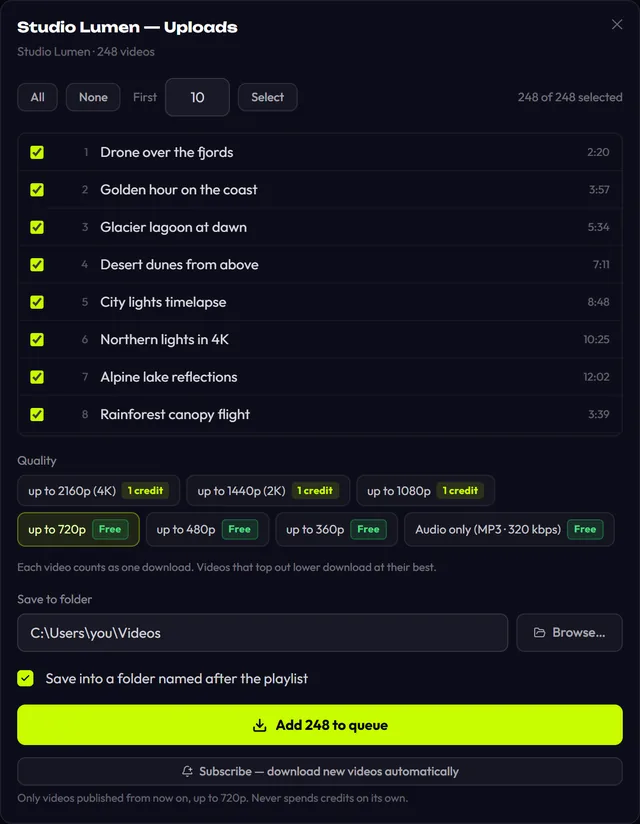
Why subscriptions never spend credits, and what that means on a free plan
Every subscription video is queued with credit spending switched off. The server still decides whether a download is free. If it is, the video downloads. If it would need a credit, because today's 10 free downloads are used up or the cap is above 720p, the app hands the reservation back and sets the video aside without charging anything.
| Situation | What happens |
|---|---|
| Free account, cap up to 720p, quota left | The video downloads and counts toward your 10 free downloads that day |
| Free account, daily quota used up | The video is set aside and offered again after the next app start; the rest of the queue keeps moving |
| Free account, cap of 1080p or higher | Every video would need a credit, so the subscription skips them. Subscribe again with up to 720p |
| Subscription or lifetime plan | Everything downloads at the cap you chose, no limit |
A video only counts as done once its download has actually started. Quit before it starts, or hit the daily limit, and it comes back next time. The plans that make subscriptions unlimited are on the pricing page.
What the app needs to keep checking
- The app has to be running. Checks happen every 6 hours while it's open. There's no background service that wakes the PC.
- Turn on Close to tray in Settings. It's off by default, so the X button quits the app. With it on, closing the window leaves an icon in the tray and checks and downloads carry on. Quit from the tray icon.
- Notifications. When the window isn't in focus, new uploads trigger a system notification, "New videos: N". You can switch it off in Settings.
- Instagram needs a login under Platform logins. Re-checks only read the newest couple of pages of the profile to go easy on your account. Instagram subscriptions weren't tested on live accounts before launch.
Managing subscriptions: check now, pause, unsubscribe
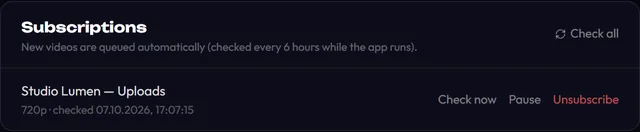
The panel lists each subscription with its title, quality cap and last check time ("not checked yet" for a new one). If a check fails, say the channel was deleted or the site didn't answer, the reason appears next to it. The buttons:
- Check now looks for new uploads on that subscription right away instead of waiting six hours; Check all does it for every subscription.
- Pause stops checking a channel without deleting it. The row says "paused", and Resume turns checks back on.
- Unsubscribe deletes the subscription. Files you already downloaded stay on disk.
To change the quality or folder, open the channel again, pick the new option and click the subscribe button once more. The existing subscription is updated, not duplicated.
Download Top Video Downloader
Free: 3 downloads without an account, then 10 a day up to 720p, no ads. 4K and unlimited downloads come with a subscription, a lifetime plan or credits.
Top Video Downloader is a desktop app
It runs on Windows, macOS and Linux. Send the link to yourself to open it on your computer, or join the waitlist for a phone version.
App subscription vs YouTube subscription: what's the difference?
Subscribing on YouTube only puts a channel in your feed. A subscription in Top Video Downloader has nothing to do with your YouTube account: it saves new uploads as MP4 files (or in your chosen audio format) to a folder, so you can watch them offline, on a flight, or after the creator deletes them. It works well as a lightweight YouTube channel archiver for new uploads. For YouTube you can also turn on SponsorBlock to cut sponsor reads out of the files. Only download what you have the right to; see is it legal to download videos.
Will a subscription download a channel's old videos?
No, only videos published after you subscribe. Everything in the list at that moment counts as already seen. If you want the full channel archive as well, tick the videos in the list and click Add to queue first, then subscribe. You end up with the back catalogue plus every new upload.
Do subscriptions use credits?
Never. Subscription videos are queued with credit spending turned off, and anything that would need a credit is set aside without a charge. On a free account they count toward your 10 free downloads a day up to 720p, which is why up to 720p is the cap to pick for a subscription.
Do subscriptions work when the app is closed?
No. Checks only run while the app is open, every 6 hours. Turn on Close to tray in Settings and the X button hides the window instead of quitting, so checks continue. If the PC was off, missed uploads are picked up on the next launch; the first check runs 90 seconds after start.
How many videos does one check download?
Up to 20 new videos per check. That cap stops a channel that reshuffles its listing from flooding your queue with hundreds of downloads. If there are more, the rest arrive on the next check six hours later, or straight away if you click Check now in the Subscriptions panel.
How many channels can I subscribe to?
Up to 100 subscriptions, in any mix of channels, playlists, TikTok profiles and Instagram profiles. Each keeps its own quality cap and folder. You can pause one you don't need for a while, or remove it with Unsubscribe; the files it already downloaded stay where they are.
Read next
- Download whole playlists, channels and profilesTop Video Downloader 2.0 downloads whole playlists, YouTube channels and TikTok or Instagram profiles to your computer. Paste the link and the app lists up to 1,000 videos; tick all, none or the first N, set one quality cap, and each video counts as one download. Free accounts get 10 a day up to 720p.
- SponsorBlock: download YouTube videos without sponsor segmentsTop Video Downloader 2.0 can strip sponsor reads that creators record into their YouTube videos from the files you download. Using the community SponsorBlock database, it cuts sponsor segments, self-promotion and like-and-subscribe reminders, or marks them as chapters instead. It works on YouTube only and is off by default.
- How to download YouTube videos on your PCCopy the video link, paste it into Top Video Downloader, click Check formats and pick a quality. The MP4 lands on your disk. Public videos need no YouTube sign-in. A free account gives you 10 downloads a day up to 720p, MP3 audio included, while 1080p, 1440p and 4K cost 1 credit per video.
- Top Video Downloader pricingTop Video Downloader is free for 10 downloads a day up to 720p with an account, plus 3 trial downloads without one. For 1080p, 4K or more downloads, buy credits (1 credit = 1 video at any quality, $4.99 for 10), a subscription from $4.99 a month, or lifetime for $34.99. Crypto only, no auto-renewal.
- Top Video Downloader changelogThis page lists every published version of Top Video Downloader with its date and changes. The app checks for updates on launch, downloads them in the background and verifies the signature before installing, so updating is usually one click on Restart.