SponsorBlock: download YouTube videos without sponsor segments
Updated October 7, 2026 · tested with version 2.0.0
Top Video Downloader 2.0 can strip sponsor reads that creators record into their YouTube videos from the files you download. Using the community SponsorBlock database, it cuts sponsor segments, self-promotion and like-and-subscribe reminders, or marks them as chapters instead. It works on YouTube only and is off by default.
- Sites
- YouTube only
- Default
- off (Keep)
- Modes
- Keep, Mark as chapters, Cut out
- Cut out removes
- sponsor reads, self-promotion, like and subscribe reminders
- Always kept
- intros, outros and every other category
- Data source
- the open SponsorBlock database, submitted by viewers
What is SponsorBlock, and why does a downloader use it?
SponsorBlock is an independent community project, best known as a browser extension. Viewers mark the parts of YouTube videos where a sponsor read, a plug for the creator's merch or a "don't forget to subscribe" happens, and those marks go into a shared database. We don't run SponsorBlock and aren't affiliated with it. Top Video Downloader simply asks its public API where those segments are in the video you're downloading.
It helps to be clear about what gets removed. The ads YouTube plays before and during a video never end up in a downloaded file anyway; they're separate videos. SponsorBlock handles the other kind: integrations the creator filmed and edited into the video itself. No ad blocker can skip those, because they are the video.
How to turn on SponsorBlock for YouTube downloads
- 1
Open Settings and scroll to the Downloads section.
- 2
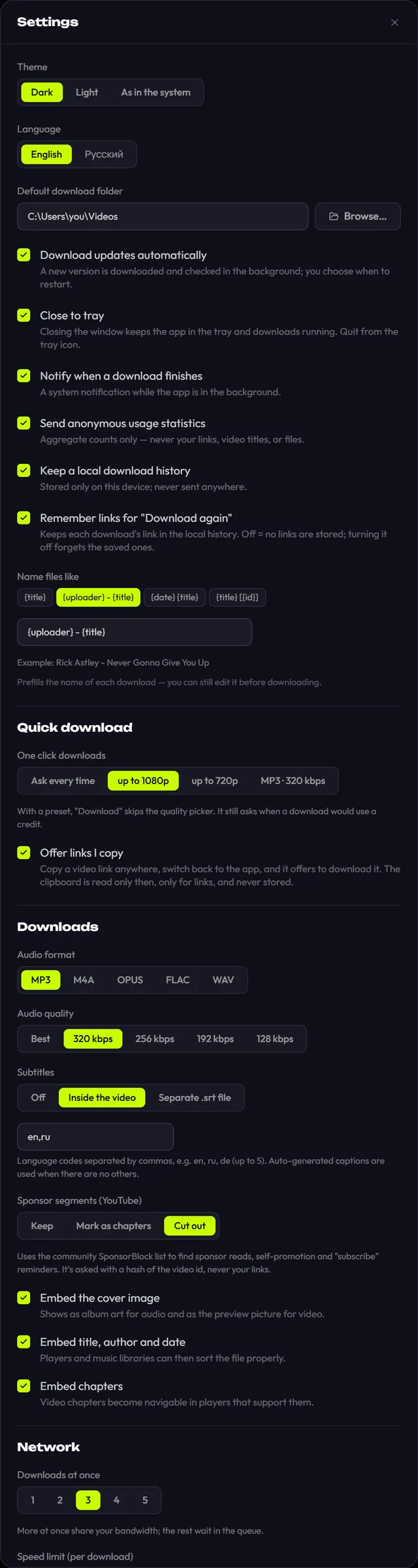
Find Sponsor segments (YouTube).
- 3
Pick Cut out to remove those segments from the file, or Mark as chapters to keep everything and just label them.
- 4
Download as usual. It's a global setting, so it applies to every YouTube download: single videos, playlists and subscriptions.
Keep, Mark as chapters or Cut out: which mode to pick
| Mode | What it does | Good for |
|---|---|---|
| Keep | Changes nothing and never contacts SponsorBlock. This is the default | When you want the video exactly as uploaded |
| Mark as chapters | Downloads the full video and turns segments from every SponsorBlock category into chapters | When you'd rather decide yourself: a player with chapter support lets you jump past them |
| Cut out | Removes sponsor reads, self-promotion and interaction reminders. Intros and outros stay | Offline viewing, and channel archives built with subscriptions |
Why aren't intros and outros cut? They're often part of the content: a title sequence, a recap, a teaser for the next episode. So Cut out sticks to the three categories almost nobody misses. If you want to see everything, intros, previews and filler included, use Mark as chapters, which labels every category.
Download Top Video Downloader
Free: 3 downloads without an account, then 10 a day up to 720p, no ads. 4K and unlimited downloads come with a subscription, a lifetime plan or credits.
Top Video Downloader is a desktop app
It runs on Windows, macOS and Linux. Send the link to yourself to open it on your computer, or join the waitlist for a phone version.
How accurate is it? What to know about community data
- People do the marking. Segments are submitted by viewers. Some are accurate to the second, some are a bit wide or narrow, and some videos have none at all.
- Fresh uploads may not be marked yet. A video posted an hour ago probably hasn't been tagged, so the sponsor read stays in. That matters most for subscriptions, which fetch videos soon after they're published.
- Cuts are joined without re-encoding. That keeps the quality, but a join can be off by a fraction of a second or so.
- Small channels get marked less often than popular ones.
If a segment slipped through and you know where it is, you can submit it yourself through the SponsorBlock browser extension, which helps everyone else too. Once it's in the database, download the video again: paste the link, or use Download again in your history (available when Remember links for "Download again" is on in Settings).
Privacy: what the app sends to SponsorBlock
On Keep, the app never contacts SponsorBlock. On Mark as chapters or Cut out, the API only receives the first characters of a hash of the video ID, not the ID itself and never your link. It returns segments for every video whose hash starts the same way, and the app picks the right one locally. So SponsorBlock can't tell which video you're downloading. The download itself still goes straight from YouTube to your computer.
SponsorBlock is a community project and its data is shared under the project's own terms. To learn more or help mark videos, visit sponsor.ajay.app. Only download what you have the right to; see is it legal to download videos.
Can I download YouTube videos without the sponsor segments?
Yes. In Top Video Downloader 2.0, go to Settings, then Downloads, and set Sponsor segments (YouTube) to Cut out. The app removes sponsor reads, self-promotion and subscribe reminders using SponsorBlock data. Segments nobody has submitted yet stay in the video, so very new uploads may still contain them.
Does SponsorBlock work for TikTok, Twitch or other sites?
No, YouTube only. The SponsorBlock database covers YouTube videos, and the app doesn't apply the setting to other sites. Videos from every other platform download unchanged, even with Cut out turned on. For trimming on other sites, the clip feature lets you keep just the part you want.
Does Cut out remove intros and outros?
No. Cut out removes only three categories: sponsor reads, self-promotion, and like or subscribe reminders. Intros and outros are often part of the content, so they stay. If you want them labelled too, choose Mark as chapters, which turns every SponsorBlock category into a chapter you can skip.
Why wasn't a sponsor read removed?
Most likely it isn't in the SponsorBlock database yet. Viewers submit segments, and new or niche videos are often unmarked. Check that Settings shows Cut out rather than Keep. Once someone marks the segment, download the video again, from its link or with Download again in your history.
Does SponsorBlock see which videos I download?
No. The app sends only the start of a hash of the video ID and gets back segments for many videos that share it, then picks the right one on your computer. Your links are never sent. On Keep, which is the default, the app makes no SponsorBlock requests at all.
Read next
- How to download YouTube videos on your PCCopy the video link, paste it into Top Video Downloader, click Check formats and pick a quality. The MP4 lands on your disk. Public videos need no YouTube sign-in. A free account gives you 10 downloads a day up to 720p, MP3 audio included, while 1080p, 1440p and 4K cost 1 credit per video.
- Subscriptions: auto-download new videos from a channelA subscription in Top Video Downloader 2.0 downloads a channel's, playlist's or profile's new videos to your computer on its own. The app checks each subscription every 6 hours while it's running (including from the tray), queues up to 20 new videos per check, and never spends credits by itself.
- Download only part of a videoTop Video Downloader 2.0 can download just part of a video instead of the whole thing. In the quality picker, tick Download only a part, type a start and end time (90, 1:30 or 1:02:03) or click a chapter. Cuts land on the nearest keyframes with no re-encoding, so the edges can shift by a second or two.
- Download whole playlists, channels and profilesTop Video Downloader 2.0 downloads whole playlists, YouTube channels and TikTok or Instagram profiles to your computer. Paste the link and the app lists up to 1,000 videos; tick all, none or the first N, set one quality cap, and each video counts as one download. Free accounts get 10 a day up to 720p.
- Top Video Downloader changelogThis page lists every published version of Top Video Downloader with its date and changes. The app checks for updates on launch, downloads them in the background and verifies the signature before installing, so updating is usually one click on Restart.