How to download SoundCloud tracks to MP3 on PC
Updated October 7, 2026 · tested with version 2.0.0
Top Video Downloader saves SoundCloud tracks to your computer as MP3, M4A, Opus, FLAC or WAV, with no SoundCloud login. Cover art and title tags are written into the file. Audio-only downloads are free within the daily quota: 10 a day with a free account, or 3 trial downloads without one.
- Works without login?
- Yes, for public tracks; a SoundCloud login is optional
- What you get
- Audio only. SoundCloud has no video, so the list shows a single Audio only option
- Formats
- MP3 (default), M4A, Opus, FLAC, WAV
- Bitrate
- 128, 192, 256 or 320 kbps, or Best (variable)
- Free plan
- 3 trial downloads; a free account gets 10 tracks a day with no credits
How to download a SoundCloud track step by step
- 1
Open the track on SoundCloud and copy the address, or use Share → Copy link.
- 2
Switch back to Top Video Downloader. With "Offer links I copy" on, a banner shows the link; click Check formats. Or paste the link into the field and click Choose quality.
- 3
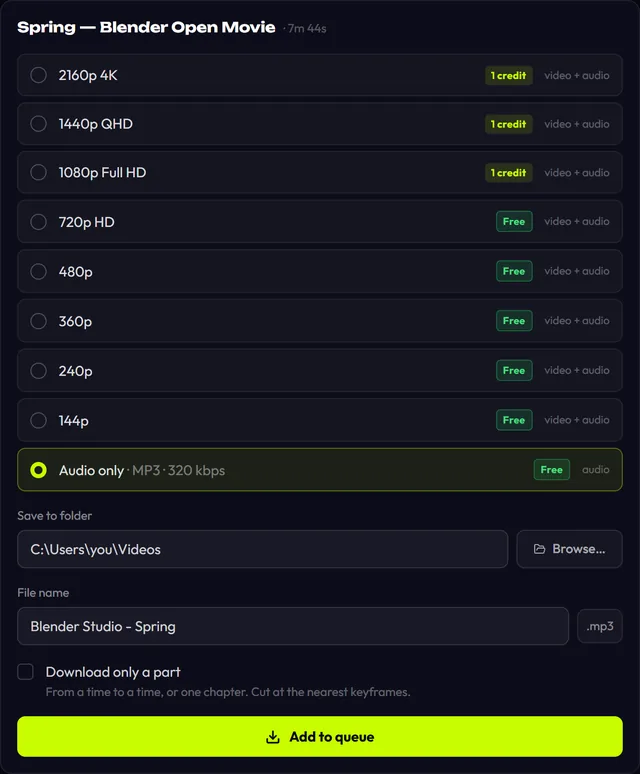
Available formats shows one row, Audio only, with your current format and bitrate, e.g. "MP3 · 320 kbps". Select it.
- 4
Only want part of a long DJ set? Tick "Download only a part" and set the times, e.g.
45:00to1:02:30. - 5
Click Add to queue. When the row says Done, click Open.
Download Top Video Downloader
Free: 3 downloads without an account, then 10 a day up to 720p, no ads. 4K and unlimited downloads come with a subscription, a lifetime plan or credits.
Top Video Downloader is a desktop app
It runs on Windows, macOS and Linux. Send the link to yourself to open it on your computer, or join the waitlist for a phone version.
SoundCloud to MP3, M4A, Opus or FLAC: which format?
Set the format and bitrate in Settings under Audio format and Audio quality. The one thing to know: the file can never sound better than the stream SoundCloud serves. Converting to 320 kbps or FLAC makes the file bigger, but it can't add detail that wasn't in the source.
| Format | Bitrate | Pick it when |
|---|---|---|
| MP3 | 128–320 kbps or Best | You want it to play everywhere: phone, car stereo, old players. The default |
| M4A | 128–320 kbps or Best | You use Apple devices or a library where M4A is native |
| Opus | 128–320 kbps or Best | You want small files that sound good; some older players can't open it |
| FLAC | None (lossless) | Your DJ software or archive insists on FLAC. Source quality won't go up |
| WAV | None | You're editing in a DAW. No cover art is embedded in WAV |
For most people, MP3 or Opus set to Best is the sensible choice: the variable bitrate follows the material instead of padding the file. Cover art, title, artist and date go into the tags by default, so the track looks right in your player straight away.
Which SoundCloud links work?
soundcloud.com/artist/track: a single track.soundcloud.com/artist/sets/name: a playlist or album. It opens as a list.soundcloud.com/artistorsoundcloud.com/artist/tracks: everything the artist uploaded, also as a list.- A private link ending in
/s-…: copy all of it. Without that code, the track stays locked. - A short link from the SoundCloud app: if it fails, open it in a browser and copy the full address from the address bar.
How to download a SoundCloud playlist or a whole profile
Version 2.0 opens a set or profile link as a list of up to 1000 items. All, None and First N (10 by default) make selection quick, and one quality setting covers the whole list; for SoundCloud that's audio only. "Save into a folder named after the playlist" keeps an album together. If your free downloads for the day run out mid-list, the app pauses and asks before using credits; it never spends them silently. More in playlists and channels.
From the same window you can subscribe to an artist. While the app is running, it checks the list every 6 hours and downloads only tracks published after you subscribed. Subscriptions never spend credits.
SoundCloud download not working? Common fixes
- "Sign-in required". The track is private or shared with specific listeners. Log in to SoundCloud under Platform logins with an account that has access, then click Save login. Cookies stay encrypted on your computer.
- "Geo-restricted". The rights holder blocked the track in your country. That's the artist's or label's decision, and the app doesn't get around it.
- Subscriber-only tracks. The app doesn't bypass SoundCloud's restrictions. If a full track is available only to Go+ subscribers, don't expect a full file.
- "Rate limited". SoundCloud slowed down too many requests, usually during a big set. Lower "Downloads at once" in Settings → Network (1 to 5) and try again later.
- "No downloadable video or audio was found at this link". You probably pasted a search, feed or discovery page rather than a track, set or profile.
The daily check results for SoundCloud and other sites are on the status page. Want audio from YouTube instead? See YouTube to MP3.
Only download what you have the right to: your own tracks, freely licensed music, or tracks the artist lets you keep. More in is it legal to download.
Is there a free SoundCloud to MP3 downloader?
Yes. Audio-only downloads in Top Video Downloader don't use credits: you get 3 trial downloads without an account and 10 a day with a free account. The daily count resets once a day (UTC). Credits only come in once the daily quota is used up.
What quality are SoundCloud downloads?
The quality SoundCloud serves. The app takes the best available audio stream and saves it in the format you chose. Picking 320 kbps or FLAC won't make it sound better than the source; it only makes the file bigger. MP3 or Opus on Best covers most needs.
Can I download a whole SoundCloud playlist at once?
Yes, in version 2.0. Paste a set or profile link and the app lists up to 1000 tracks. Tick all of them or the first N, choose audio only, and click Add to queue. You can save them into a folder named after the playlist.
Do I need a SoundCloud account to download tracks?
Not for public tracks; the link is enough. You only need to log in when a track is private or shared with a limited audience. Do that under Platform logins: the login window opens SoundCloud's own site, and the cookies stay encrypted on your computer.
Does it keep the cover art and track title?
Yes. By default the app writes the cover art, title, artist and date into the file, so the track shows up properly in your player and library. WAV is the exception, as no cover is embedded there. To turn it off, untick "Embed the cover image" and "Embed title, author and date" in Settings.
Can I download just part of a long mix?
Yes. In the quality window, tick "Download only a part" and enter a start and end as 90, 1:30 or 1:02:03. Only that section is downloaded, and the file name gets a time-range suffix. Details are on the clips page.
Read next
- How to convert YouTube to MP3 on your PCTop Video Downloader pulls the audio out of any YouTube video and saves it as MP3, or as M4A, Opus, FLAC or WAV. On a free account audio has no quality cap and counts toward your 10 daily downloads. One catch: YouTube's own audio is about 130 kbps, so a 320 kbps MP3 is bigger, not better.
- Download whole playlists, channels and profilesTop Video Downloader 2.0 downloads whole playlists, YouTube channels and TikTok or Instagram profiles to your computer. Paste the link and the app lists up to 1,000 videos; tick all, none or the first N, set one quality cap, and each video counts as one download. Free accounts get 10 a day up to 720p.
- Subscriptions: auto-download new videos from a channelA subscription in Top Video Downloader 2.0 downloads a channel's, playlist's or profile's new videos to your computer on its own. The app checks each subscription every 6 hours while it's running (including from the tray), queues up to 20 new videos per check, and never spends credits by itself.
- Download only part of a videoTop Video Downloader 2.0 can download just part of a video instead of the whole thing. In the quality picker, tick Download only a part, type a start and end time (90, 1:30 or 1:02:03) or click a chapter. Cuts land on the nearest keyframes with no re-encoding, so the edges can shift by a second or two.
- Download videos from other sites: Bilibili, Rumble, Kick and dozens moreBeyond the big platforms, Top Video Downloader saves video and audio from Bilibili, Niconico, Dzen, Coub, Rumble, Kick, Streamable, Bandcamp, 9GAG, Tumblr and other sites. Most work without a login; LinkedIn, Patreon and Boosty need your own account. We check 63 platforms daily, and you can test any other link in seconds.
- Is it legal to download videos from YouTube and other sites?Downloading a video isn't automatically legal or illegal: it depends on who owns it, what the site's terms allow and where you live. Your own uploads, public-domain films and Creative Commons videos are generally fine. YouTube's terms forbid downloading without its permission, and sharing someone else's video almost always needs the rights holder's consent.