Top Video Downloader 2.0 is here: what's new
Updated November 2, 2026 · tested with version 2.0.0
Top Video Downloader 2.0 shipped on November 2, 2026. The big ones: whole playlists, channels and profiles, subscriptions to new uploads, clip downloads, SponsorBlock for YouTube, a real pause, sign-in with an email code, Google or Telegram, and a $34.99 lifetime plan. Updating from 0.1.x is free and happens inside the app.
The first version came out in July and did the basics: paste a link, pick a quality, get a file. Over the summer we shipped six 0.1.x updates while building 2.0 on the side. None of it went out piecemeal, so everything below lands in one update. The app is still desktop-only: Windows, macOS on Apple Silicon, and Linux x86-64.
What's new in 2.0 at a glance
- Playlists, YouTube channels, TikTok and Instagram profiles: up to 1,000 videos per link, plus importing a list of links from a file.
- Subscriptions: a channel's new uploads download themselves and never spend credits.
- Clips: download only part of a video, by time or by chapter.
- SponsorBlock for YouTube: cut or mark sponsor segments.
- Audio as MP3, M4A, Opus, FLAC or WAV; subtitles; cover art, tags and chapters in the file.
- A real pause, 1–5 downloads at once, a speed limit, proxy support.
- History search, Download again, filename templates.
- Tray icon, notifications, a light theme, background updates, a Russian installer.
- Sign in with an email code, Google or Telegram; lifetime and family plans.
- A separate update channel for the download engine, and a public status page.
Download whole playlists and channels
In 0.1.x a playlist link got you one video. Now you get a list of up to 1,000 videos with titles and lengths. Tick all, none or the first N, pick one quality cap for the lot, and save into a folder named after the playlist. A YouTube channel's Videos, Shorts and Live tabs merge into a single list. You can also paste several links at once or import a .txt file to build your own batch.
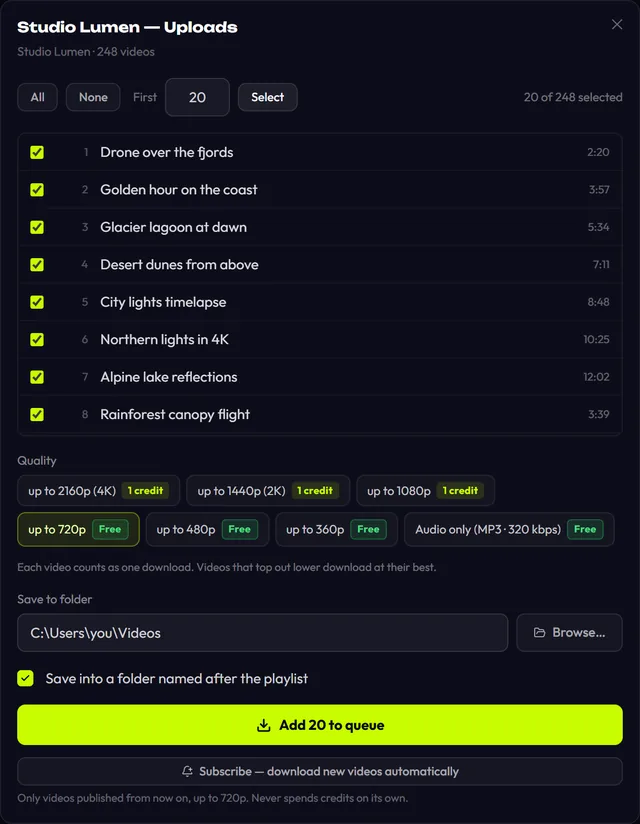
A list never spends credits quietly. If your free downloads for the day run out halfway, the rest pauses and the app asks whether to continue with credits. The full walkthrough is in playlists and channels.
Subscriptions: new uploads arrive on their own
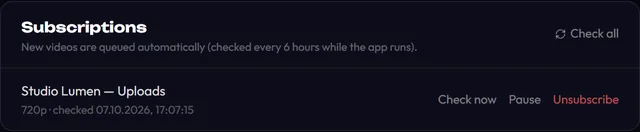
Under a channel or playlist list there's now a Subscribe — download new videos automatically button. The app checks subscriptions every 6 hours while it's running, tray included, and queues up to 20 new videos per check at the quality and in the folder you chose. It leaves the back catalogue alone and never spends credits. Limits and requirements are covered in subscriptions.
Clips and SponsorBlock
The quality picker has a new Download only a part box. Type times as 90, 1:30 or 1:02:03, or click a chapter if the video has them. Cuts land on keyframes without re-encoding, which is fast and lossless but can shift an edge by a second or two (details). For YouTube, Settings now has SponsorBlock: using the community database, the app cuts sponsor reads, self-promotion and subscribe reminders out of the file, or marks them as chapters. It's off by default.
More control over the file you get
- Audio: MP3 plus M4A, Opus, FLAC and WAV, at 128, 192, 256 or 320 kbps or best VBR.
- Subtitles: embedded in the video or as a separate .srt, up to 5 languages, with auto-generated captions as a fallback.
- Embedding: cover art, title, author, date and chapters, all on by default.
- File names: a template built from
{title},{uploader},{date},{id}and{platform}, such as{uploader} - {title}. - Quick download: presets for up to 1080p, up to 720p or audio skip the quality picker, but still ask if a credit would be used.
- Clipboard: copy a link anywhere, switch back to the app, and it offers to download it.
A real pause, network settings and a searchable history
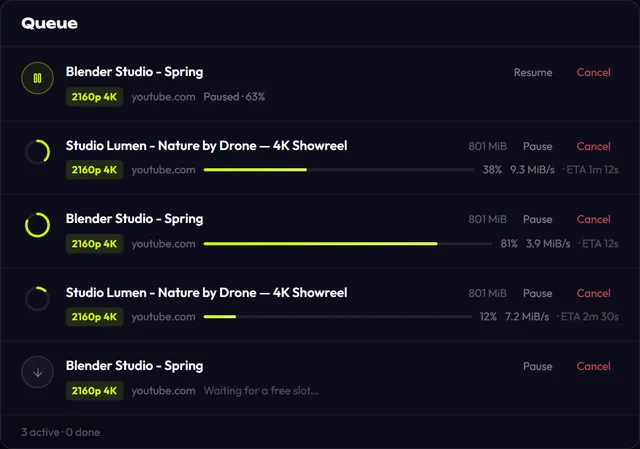
Pause is real now: Resume continues from the same byte instead of starting over. If the app is closed or crashes, the next launch offers to resume interrupted downloads and returns any held credits. Network settings let you run 1 to 5 downloads at once, cap the speed per download from 512 KB/s to 10 MB/s, and set an http, https or socks proxy. History (up to 500 entries, stored only on your PC) gains search by title, site, quality or path, plus a Download again button.
Sign in without a license key: email, Google or Telegram
License keys still work, but you no longer have to keep one handy. Sign in with a 6-digit code sent by email (valid for 10 minutes), with Google in your normal browser, or through the Telegram bot @tvd_login_bot by pressing its confirm button. Your account panel now lists your devices and purchases.
New prices and a lifetime plan
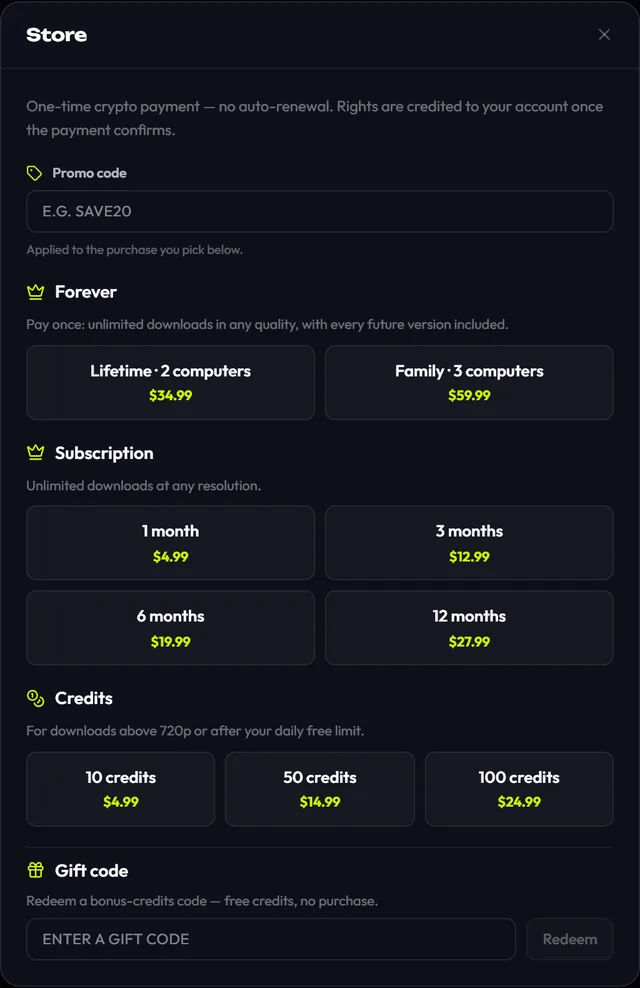
| Plan | Price |
|---|---|
| Subscription: 1 / 3 / 6 / 12 months | $4.99 / $12.99 / $19.99 / $27.99 |
| Credits: 10 / 50 / 100 | $4.99 / $14.99 / $24.99 |
| Lifetime, 2 computers | $34.99 |
| Family lifetime, 3 computers | $59.99 |
Lifetime means unlimited downloads at any quality, every future version included, for one payment. Against the monthly plan it pays for itself in month eight (seven months at $4.99 already comes to almost $34.99); against the yearly plan, during year two. To be upfront about credits: 10 credits drop from $9.99 to $4.99 and 50 from $15.00 to $14.99, but the 100-credit pack goes up from $20.00 to $24.99. Credits you already bought stay on your balance and don't expire. The free plan is unchanged: 10 downloads a day up to 720p. Full terms are on the pricing page.
Faster fixes: the yt-dlp channel and the status page
In August TikTok stopped serving videos for a week, and fixing it meant shipping a whole new app version. Now the yt-dlp download engine updates on its own track: the app checks 20 seconds after launch and then every 6 hours, and only installs updates with a valid digital signature. If the signature doesn't match, it keeps the version it has. We test 63 platforms every day, and the latest results are now public on the status page, including what's broken right now.
How to update from 0.1.x
- 1
Open the app. It checks for updates on its own, and the Updates button gets a dot.
- 2
Open Updates and click Download & install. The installer is downloaded and its signature checked before anything runs.
- 3
Click Restart & install. On Windows the 2.0 installer opens, in Russian or English to match your Windows language. On macOS the .dmg opens; drag the app into Applications. On Linux the new AppImage starts.
- 4
Your account, credits and subscription live on our server, so they're all there after the update.

After that it gets easier. 2.0 turns on Download updates automatically: new versions download and verify in the background, and all you see is "Version X is ready." Running downloads are paused cleanly before the restart and can be resumed. If anything goes wrong, download the installer from this site and install over the old one. If you run the .deb package, the simplest route is the new .deb from GitHub Releases. One small thing: the copied-link offer is off for installs upgraded from 0.1.x; switch it on in Settings.
What's brand new, and where we'd like your help
Some parts of 2.0 were only exercised against test data before launch, not real accounts. If any of these misbehave for you, tell us on Telegram; that's the fastest way to get it fixed.
- Google and Telegram sign-in, and email codes in both languages;
- Instagram profile lists and Instagram subscriptions;
- updating from 0.1.x inside the app;
- buying a lifetime plan, and the 2- or 3-computer device limit.
One security change to know about: if your account's email was never verified, your first sign-in with a verified email issues a new license key, and your other computers are signed out once. The complete list of changes is in the changelog.
Download Top Video Downloader
Free: 3 downloads without an account, then 10 a day up to 720p, no ads. 4K and unlimited downloads come with a subscription, a lifetime plan or credits.
Top Video Downloader is a desktop app
It runs on Windows, macOS and Linux. Send the link to yourself to open it on your computer, or join the waitlist for a phone version.
Is the 2.0 update free?
Yes, the update is free for everyone. The free plan is the same as before: 10 downloads a day up to 720p. Your subscription and any credits carry over unchanged, because they're stored with your account on our server, not inside the app. A lifetime plan also covers every future version.
How do I update from 0.1.x to 2.0?
Open Updates in the app, click Download & install, then Restart & install. The installer's signature is checked before it runs. If the in-app update doesn't work for you, download the 2.0 installer from this site and install it over the old version; your account and credits are kept.
How much is the lifetime plan?
$34.99 once for 2 computers, or $59.99 for the family plan on 3 computers. It's unlimited downloads at any quality, 4K included, with every future version. Payment is in crypto with no auto-renewal. Compared with the $4.99 monthly subscription, it pays for itself in the eighth month.
Is there a phone version now?
No. Top Video Downloader 2.0 is still a desktop app for Windows, macOS on Apple Silicon and Linux x86-64. What you can do on a phone today, and how to join the waitlist for a mobile version, is on the mobile page.
Read next
- Download whole playlists, channels and profilesTop Video Downloader 2.0 downloads whole playlists, YouTube channels and TikTok or Instagram profiles to your computer. Paste the link and the app lists up to 1,000 videos; tick all, none or the first N, set one quality cap, and each video counts as one download. Free accounts get 10 a day up to 720p.
- Subscriptions: auto-download new videos from a channelA subscription in Top Video Downloader 2.0 downloads a channel's, playlist's or profile's new videos to your computer on its own. The app checks each subscription every 6 hours while it's running (including from the tray), queues up to 20 new videos per check, and never spends credits by itself.
- Download only part of a videoTop Video Downloader 2.0 can download just part of a video instead of the whole thing. In the quality picker, tick Download only a part, type a start and end time (90, 1:30 or 1:02:03) or click a chapter. Cuts land on the nearest keyframes with no re-encoding, so the edges can shift by a second or two.
- SponsorBlock: download YouTube videos without sponsor segmentsTop Video Downloader 2.0 can strip sponsor reads that creators record into their YouTube videos from the files you download. Using the community SponsorBlock database, it cuts sponsor segments, self-promotion and like-and-subscribe reminders, or marks them as chapters instead. It works on YouTube only and is off by default.
- Top Video Downloader pricingTop Video Downloader is free for 10 downloads a day up to 720p with an account, plus 3 trial downloads without one. For 1080p, 4K or more downloads, buy credits (1 credit = 1 video at any quality, $4.99 for 10), a subscription from $4.99 a month, or lifetime for $34.99. Crypto only, no auto-renewal.
- Top Video Downloader changelogThis page lists every published version of Top Video Downloader with its date and changes. The app checks for updates on launch, downloads them in the background and verifies the signature before installing, so updating is usually one click on Restart.