How to download Dailymotion videos on PC
Updated October 7, 2026 · tested with version 2.0.0
To download a Dailymotion video on PC, paste a dailymotion.com/video/… or dai.ly/… link into Top Video Downloader and pick a quality. Public videos need no Dailymotion login. You get an MP4, and 720p or lower is free: 10 downloads a day with a free account.
- Works without login?
- Yes for public videos; a Dailymotion login is optional, for private ones
- Max quality
- The best Dailymotion serves for that video
- Formats
- MP4 (MKV if the codec can't go into MP4); audio as MP3, M4A, Opus, FLAC or WAV
- Free plan
- 3 trial downloads; a free account gets 10 a day up to 720p
- Runs on
- Windows 10/11, macOS on Apple Silicon, Linux x86-64
How to download from Dailymotion in 5 steps
- 1
Open the video on Dailymotion and copy the address. The short
dai.ly/…link from the Share button works too. - 2
In Top Video Downloader, paste the link into the
https://…field and click Choose quality. With "Offer links I copy" on, just switch back to the app and click Check formats on the banner. - 3
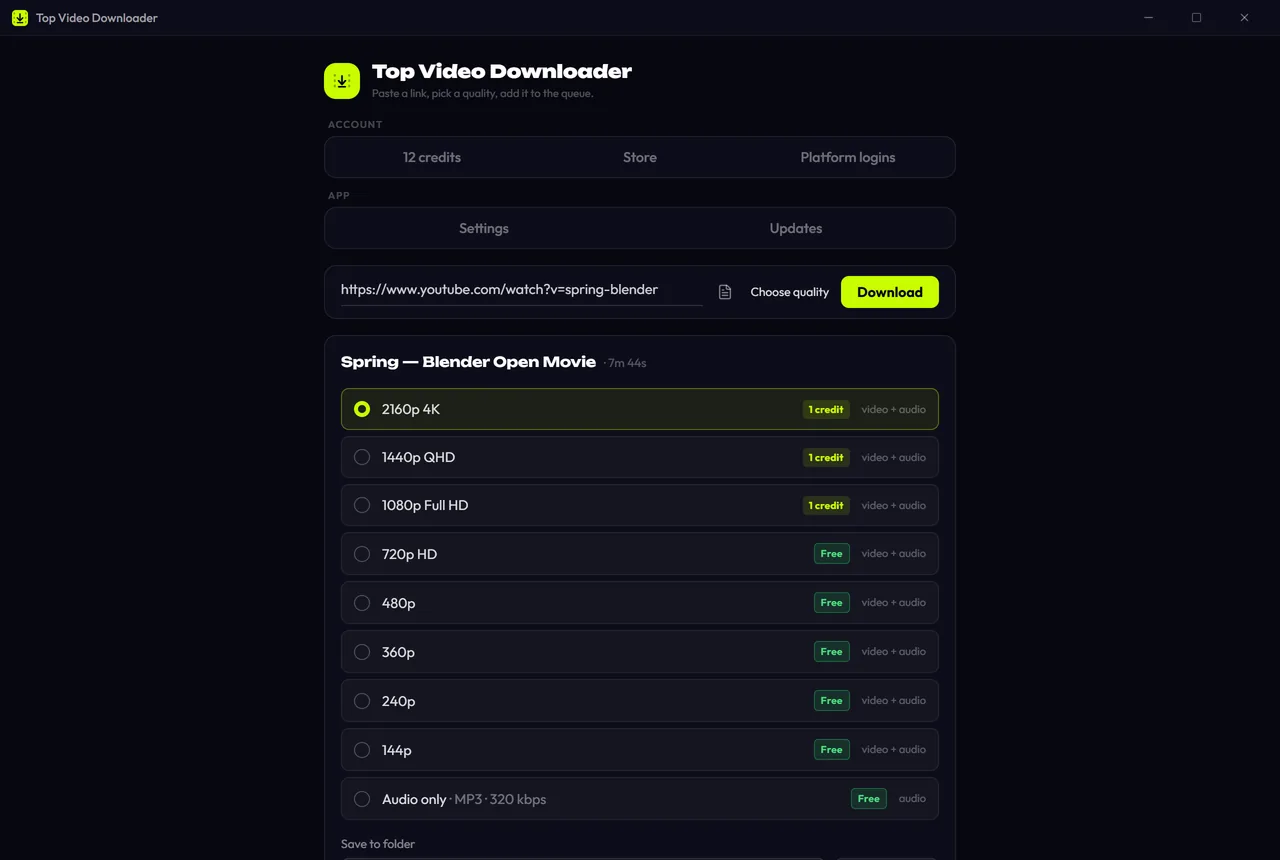
In Available formats, pick a height. Free is shown next to 720p and lower, "1 credit" next to 1080p and up. For sound only, choose Audio only.
- 4
Change the folder or file name if you like, then click Add to queue. Add a few more videos while you're at it; three download at once by default.
- 5
When the row says Done, click Open. The video also lands in History; Download again works if you turned on "Remember links" in Settings (it is off by default).
Download Top Video Downloader
Free: 3 downloads without an account, then 10 a day up to 720p, no ads. 4K and unlimited downloads come with a subscription, a lifetime plan or credits.
Top Video Downloader is a desktop app
It runs on Windows, macOS and Linux. Send the link to yourself to open it on your computer, or join the waitlist for a phone version.
Which Dailymotion links work?
| Link | What you get |
|---|---|
dailymotion.com/video/x8abcd1 | One video; the title slug after the ID can stay |
dai.ly/x8abcd1 | The short link to the same video |
dailymotion.com/embed/video/x8abcd1 | An embedded player link from another website |
dailymotion.com/playlist/x6abcd | A playlist, opened as a list you tick videos in |
dailymotion.com/channel-name | A channel's videos, also as a list when Dailymotion returns it in full |
Lists are new in 2.0: up to 1000 items, All / None / First N buttons, one quality setting for the whole list, and an optional folder named after the playlist. See playlists and channels.
Dailymotion download quality: what to pick
Dailymotion serves each video in several heights, and the app lists them all, best first. You won't see a row higher than the video has: if the uploader only had 720p, there is no 1080p row. Your pick is saved as an MP4 with sound. ffmpeg ships with the installer, so there is nothing else to download.
| Pick | Cost | Good for |
|---|---|---|
| 1080p and up | 1 credit or a subscription | Big screens and editing |
| 720p | Free | A good balance for laptops and phones |
| 480p and lower | Free | Small files on a slow connection |
| Audio only | Free within the quota | Interviews, podcasts and music without the picture |
Dailymotion video not downloading? Errors and fixes
| What the app shows | Why | What to do |
|---|---|---|
| "Geo-restricted" | The rights holder blocked the video in your country, common with sports and TV | It's a restriction at the source; the app doesn't get around it |
| "Sign-in required" | The video is private or age-restricted | Platform logins → Dailymotion → Log in, then Save login |
| "Unavailable" | The video was deleted, made private or blocked | Open the link in a browser; if it's gone there too, there's nothing to download |
| HTTP 403 | Bot protection turned the first request away | The app retries on its own while presenting itself as Chrome; if that fails too, try later |
| "Network" | The connection dropped or the site was too slow to answer | Click Retry on the queue row; if it keeps failing, check your connection or the proxy under Settings → Network |
You can see how Dailymotion does in our daily check on the status page. Live broadcasts are a different case; see downloading live streams.
Online Dailymotion downloader vs desktop app
| Online "paste a link" site | Top Video Downloader | |
|---|---|---|
| Ads | Usually plenty, sometimes pop-ups | None |
| Several videos | One at a time | A queue, plus whole playlists |
| Whose server the file passes through | The service's | None: from Dailymotion straight to your disk |
| Install | Not needed | Needed; Windows, macOS on Apple Silicon, Linux |
An online site is handier for a single video on someone else's computer. For regular downloads, the app wins on the queue and the lack of ads. Full comparison: online downloader vs desktop app.
Only download videos you have the right to, and follow Dailymotion's terms. More in is it legal to download videos.
Can I download Dailymotion videos without signing up?
Yes. Public videos need no Dailymotion login, and you don't need a Top Video Downloader account for the first 3 trial downloads. After that, a free account gives you 10 downloads a day up to 720p. For 1080p and above you need a credit or a subscription.
How do I download a Dailymotion video as MP4?
Paste the link into the app, pick a quality and click Add to queue. The video is saved as an MP4 with sound, because the app merges the streams with its bundled ffmpeg. Only if the source codec can't go into MP4 do you get an MKV, which VLC and most modern players open.
Can I download a Dailymotion playlist?
Yes, in version 2.0. Paste the playlist link and the app shows a list of up to 1000 videos where you can tick all, none or the first N. One quality setting applies to the whole list, and the files can go into a folder named after the playlist.
How do I convert Dailymotion to MP3?
Tick Audio only in the quality window. You get an MP3 by default; in Settings you can choose M4A, Opus, FLAC or WAV and a bitrate from 128 to 320 kbps. Audio-only downloads are free within your daily quota.
Why does Dailymotion say the video isn't available in my country?
The rights holder limited the video to certain countries, so Dailymotion won't serve it to your address. The app then shows "Geo-restricted" and does not get around the restriction. Check whether the same video is on an official channel that is open in your region.
Do I need to install anything besides the app?
No. The installer already includes the yt-dlp engine and ffmpeg for merging and converting, plus an embedded Python for yt-dlp on Windows. Once it's installed, you just paste a link. It runs on Windows, macOS on Apple Silicon and Linux x86-64.
Read next
- How to download Vimeo videos on PCTop Video Downloader saves public Vimeo videos to your PC without signing in: paste the link, pick a quality, and you get an MP4 (MKV when needed) up to 4K when the creator uploaded 4K. Private videos need your own Vimeo login inside the app, and password-protected videos are not supported.
- Download whole playlists, channels and profilesTop Video Downloader 2.0 downloads whole playlists, YouTube channels and TikTok or Instagram profiles to your computer. Paste the link and the app lists up to 1,000 videos; tick all, none or the first N, set one quality cap, and each video counts as one download. Free accounts get 10 a day up to 720p.
- How to download live stream recordings (VODs)Top Video Downloader downloads recordings of streams that have ended: past YouTube live streams, Twitch VODs and highlights, VK Video and Rutube recordings. Wait for the broadcast to finish, copy the recording link and paste it into the app. We haven't tested capturing a stream while it's still live, so this guide covers finished recordings only.
- Online video downloader vs desktop appAn online downloader is fine for one short clip: nothing to install, and it works on a phone. A desktop app such as Top Video Downloader is better when you want 1080p or 4K with sound, whole playlists, videos behind a login and no ads. Here is how the two compare on quality, safety, privacy, batch downloads and speed.
- Download videos from other sites: Bilibili, Rumble, Kick and dozens moreBeyond the big platforms, Top Video Downloader saves video and audio from Bilibili, Niconico, Dzen, Coub, Rumble, Kick, Streamable, Bandcamp, 9GAG, Tumblr and other sites. Most work without a login; LinkedIn, Patreon and Boosty need your own account. We check 63 platforms daily, and you can test any other link in seconds.
- Is it legal to download videos from YouTube and other sites?Downloading a video isn't automatically legal or illegal: it depends on who owns it, what the site's terms allow and where you live. Your own uploads, public-domain films and Creative Commons videos are generally fine. YouTube's terms forbid downloading without its permission, and sharing someone else's video almost always needs the rights holder's consent.